Microsoft Copilot is increasingly evolving from a support function to a real work tool in sales. With the new possibilities around Copilot Agents, the use now goes far beyond classic support.
Sales teams can not only speed up individual tasks, but also make entire processes more structured and consistent. The effect is not created by automation on a large scale, but by targeted relief in everyday life.
What Microsoft Copilot can do in sales today
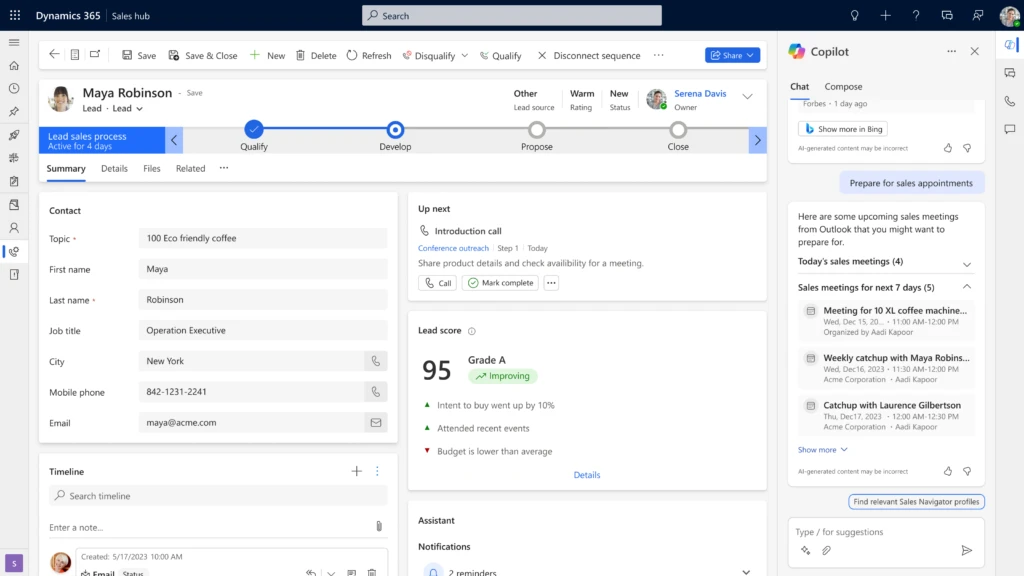
Microsoft Copilot is integrated directly into the central working environment. In sales, these include Outlook, Teams, Word, Excel and Dynamics 365 Sales. This allows Copilot to access existing data, communications, and documents.
In sales, this means that information no longer has to be collected manually. Instead, content is automatically prepared contextually. With the introduction of Copilot Agents, this approach is expanding. Agents can take over recurring tasks, structure information and provide independent support in certain processes.
The difference is important. While Copilot supports individual tasks, agents can accompany entire processes.
What specific functions Copilot offers in sales
The functions of Copilot are now very concrete and can be used directly in everyday life. In the area of communication, Copilot can analyze and summarize emails and create response suggestions. Content is generated based on existing conversations. In meetings within Teams, Copilot can transcribe conversations, summarize them, and derive next steps. Decisions and tasks are not lost as a result. In CRM systems such as Dynamics 365, Copilot supports the maintenance of data, the analysis of customer information and the assessment of sales opportunities.
Documents such as proposals or presentations can be created or adapted automatically. Copilot takes existing content and adapts it to the context.
Copilot Agents: What changes as a result
Copilot Agents creates a new level in the use of AI in sales.
Agents can be configured for specific tasks or processes. They access defined data sources and work within clear rules.
This enables, for example:
- Automatic preparation of customer appointments
- Structured follow-up of deals
- Support in the qualification of leads
The advantage lies in the repeatability. Tasks that occur regularly can be supported consistently.
Concrete use cases in everyday sales
The added value of Copilot is particularly evident in concrete situations.
Preparation for a customer meeting
Copilot can compile all relevant information before an appointment. This includes previous conversations, emails, documents, and CRM data.
A Copilot agent can standardize this process. A structured overview is automatically created before each appointment.
This reduces preparation time and ensures consistent quality.
Follow up and next steps
After a conversation, Copilot can create a summary and suggest concrete next steps. Tasks can be transferred directly to systems.
An agent can also check whether follow-ups have taken place and trigger reminders if necessary.
As a result, fewer issues are left unaddressed and processes become more reliable.
Preparation of offers
Copilot can access existing offers and create new designs from them. Content is adapted and structured.
An agent can help you automatically insert standard components and adapt content to specific types of customers.
The effort is reduced and at the same time the quality remains consistent.
Overview of pipeline and activities
Copilot can analyze and summarize data from the CRM. Sales teams get a structured view of deals, risks, and next steps.
An agent can also monitor defined criteria. For example, deals with no activity or missing next steps.
This makes prioritization and control easier in everyday life.
Where co-pilots and agents help in everyday life
The greatest benefit arises from tasks that occur regularly and tie up time.
These include:
- Compilation of information
- Documentation of conversations
- Creation of standard content
- Activity tracking
These tasks are necessary, but often manual and error-prone. Copilot and agents provide relief here.
Quick Steps: How to get started sensibly
The entry should be clearly structured. Not every function automatically adds value.
Important steps are:
- Define concrete use cases
- Identify recurring tasks
- Integrate Copilot into existing tools
- Set up the first agents for simple processes
- Regularly review and adjust usage
This creates a clear focus on actual benefits.
What is crucial for successful use
Copilot and agents are particularly effective when they are embedded in existing processes.
Important prerequisites are:
- Consistent and maintained data
- Clear processes in sales
- common understanding in the team
Without this basis, the effect remains limited.
Conclusion: Copilot is becoming an integral part of sales
Microsoft Copilot is increasingly becoming a permanent support in everyday sales. Especially with Copilot Agents, it is possible to accompany recurring tasks in a structured way. The benefit lies not in individual functions, but in the combination of support, structure and consistency. Sales teams can work faster, make better use of information, and make operations more stable. The decisive factor is how specifically Copilot is used and how well it is integrated into existing processes.
Do you want to use Copilot and Copilot Agents in your company at short notice? Let’s talk briefly about how we can support you in this!
FAQ
What are Copilot Agents in Sales
Copilot Agents are configurable functions that support recurring tasks in sales and accompany them in some cases automatically.
Where does Copilot bring the greatest benefit
Especially in the preparation, documentation, communication and follow-up of activities.
How to get started with Copilot Agents
With clearly defined use cases and simple processes that can be expanded step by step.