Artificial intelligence is currently developing much further than classic chatbots or simple text generators. Microsoft Copilot Agents opens up new possibilities to support recurring tasks directly in everyday work and to control operational processes more intelligently. Instead of just generating responses, agents can retrieve information, analyze data, summarize content, or perform actions in other systems.
Companies with many manual processes in particular are therefore intensively concerned with the question of how AI can be meaningfully integrated into existing processes. The combination of natural language, Microsoft 365, Dynamics 365 and the Power Platform is particularly exciting. This results in practical use cases that are not only theoretically interesting, but actually save time and simplify processes in everyday life.
However, many companies are still starting very unspecifically in the topic. AI is tested without defining concrete processes or clear goals. This is exactly where Copilot Agents differ from classic AI applications. They are set up specifically for operational tasks and connected directly to existing data sources and systems.
In this article, you will learn which tasks can be automated particularly well today, how companies go about setting up Copilot Agents, and what really matters when implementing them.
What distinguishes Copilot Agents from classic AI tools
Many AI applications today function mainly as assistants for individual tasks. They help write texts, answer questions or create summaries. Copilot Agents go much further. They can actively interact with systems and support operational processes.
This results in much more practical applications in everyday life. For example, an agent can retrieve information from Dynamics 365, analyze meetings, create tasks, or process data between different systems. At the same time, different tools can be combined with each other so that not only individual content is created, but entire processes are supported.
Particularly interesting is the combination of natural language and existing enterprise systems. Users no longer have to work directly with complex interfaces, but can control tasks based on voice. This is exactly what makes AI truly operationally usable for many teams for the first time.

Which tasks can be automated particularly well today
The greatest added value is currently not created in spectacular future scenarios, but in clearly defined routine processes. This is exactly where many teams lose time every day due to manual work steps, recurring reconciliations or redundant data entry.
Copilot Agents are currently being used particularly frequently to summarize information, analyze data or transfer content between different systems. This applies, for example, to project status updates, CRM maintenance, meeting documentation or internal knowledge search.
In the project environment, agents can, for example, analyze meetings, derive tasks from meeting minutes or summarize current project information. Above all, this reduces manual administrative effort. Teams spend less time on documentation and more time on actual project work.
Many useful use cases are also currently emerging in sales. Agents can analyze leads, pull information from emails, or prepare opportunities. It is particularly helpful that data no longer has to be transferred manually between different systems.
In the Microsoft 365 environment, many practical assistance functions are also being created. These include, for example:
- Summaries of emails
- Analysis of Teams messages
- Preparation of meetings
- Document Creation
- Managing tasks
It is precisely such processes that show that Copilot Agents can already provide concrete operational support today and are not just experimental AI features.
How companies go about building Copilot Agents
Many companies are currently making the same mistake. You start directly with complex AI projects and try to fully automate large processes. In practice, small and clearly defined use cases work much better.
The most important step is therefore not the technology, but the selection of a meaningful problem. Good first use cases are repetitive tasks with clear processes and fixed data sources. Processes with high manual effort and standardized work steps are particularly suitable.
Many successful projects therefore start with small operational tasks. This includes, for example, internal summaries, CRM updates or simple support processes. This results quickly and teams learn at the same time how to build agents in a meaningful way.
It is also important to develop agents gradually. Successful teams usually start with simple functions and expand them iteratively. As a result, processes remain controllable and errors can be detected much faster.
Why data sources and tools are crucial
An agent is only as helpful as the information and systems it can access. That’s exactly why data sources and tool connections play a central role.
Modern Copilot Agents can be equipped with, among other things:
- Dynamics 365
- Dataverse
- SharePoint
- Teams
- Outlook
- Power Automate
- External APIs
.
This creates the real added value. The agent does not work in isolation, but within existing company processes.
The possibility of combining different systems with each other is particularly exciting. For example, an agent can evaluate information from Teams, then update data in Dynamics 365, and then automatically generate a document in SharePoint.
This results in end-to-end processes instead of individual isolated automations.


Why clear instructions are so important
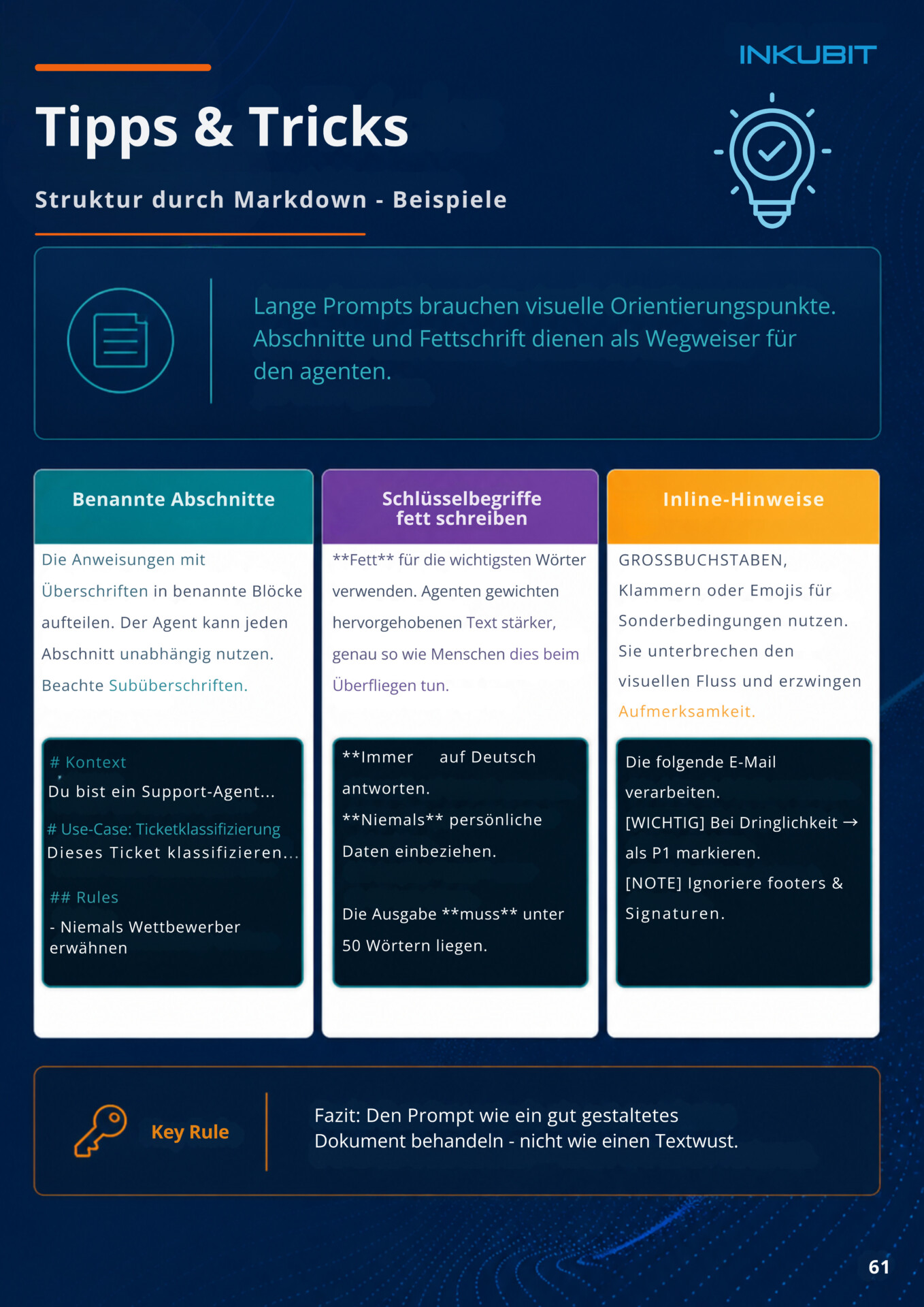
Many problems are not caused by the AI itself, but by unclear instructions. Agents require much more structure than many companies initially expect.
The more clearly it is described:
- which task is to be solved
- which tools may be used
- which rules apply
- what results should look like
the more reliably the agent works.
Especially with more complex processes, it quickly becomes apparent how important clear instructions are. General instructions often lead to inaccurate results or unexpected behavior. Structured specifications, on the other hand, significantly improve quality.
The following are helpful:
- Clear headings
- Defined steps
- Concrete examples
- unique tool descriptions
- Clear input and output formats
A good comparison is a new employee. There, too, processes only function reliably if expectations, rules and procedures are clearly described. Exactly the same logic applies to Copilot Agents.
Continuous testing is also particularly important. Instructions will rarely work perfectly on the first try. Successful teams therefore improve their agents iteratively and adapt rules and processes step by step.

Why small steps are often more successful
Many AI projects currently fail not because of the technology, but because of too high expectations. Companies try to fully automate entire processes immediately and quickly lose control over quality and stability.
Iterative approaches are much more successful. Teams start with small tasks, test processes early on and expand functions step by step. This results in much more robust solutions and employees understand more quickly how AI can be meaningfully integrated into existing processes.
Continuous testing remains particularly important. Agents should not be developed once and then used productively unchanged. Successful projects continuously improve processes and define clear test cases for different scenarios.
Especially in productive processes, this quickly makes it clear where additional rules, approvals or adjustments are necessary.
Why Human in the Loop remains important
Despite modern AI functions, agents should not work autonomously indefinitely. Control mechanisms remain important, especially in sensitive processes.
That’s why many companies deliberately rely on confirmation steps or so-called approval gates. Certain actions are not performed until they are approved. This applies, for example:
- E-mail dispatch
- Calendar changes
- CRM Updates
- Deletions
- Document Sharing
The goal is not complete automation at any price. Much more important is controlled support in everyday work.
Governance, authorizations and data quality therefore remain crucial issues, especially in productive processes.
The role of Microsoft Copilot Studio
Microsoft Copilot Studio is currently becoming a central platform for creating your own agents. Companies can configure agents, connect data sources, define processes and integrate different tools.
It is particularly interesting that many tasks can now be implemented with low code or no code. This creates significantly lower barriers to entry than with classic development projects.
This allows teams to test new use cases more quickly and develop initial automations much more pragmatically. Especially in combination with Dynamics 365, Microsoft 365 and the Power Platform, this is currently creating a lot of new application possibilities.
Why many AI projects fail
Many companies are currently focusing too much on technology and too little on processes. AI alone does not solve organizational problems.
Typical causes of failed projects are:
- Unclear goals
- Lack of data quality
- bad instructions
- Use cases that are too large
- lack of governance
- unrealistic expectations
It becomes particularly problematic when agents are supposed to work without clear rules or when there are no reliable data structures.
The most successful projects therefore usually start small, work with clear processes and develop their solutions step by step.
Conclusion
Copilot agents are currently evolving from simple AI assistants to operational tools for everyday work. Particularly repetitive tasks with clear processes can already be sensibly automated today.
The most important success factor is not technology alone. Clear use cases, structured processes, good data quality and step-by-step implementation are crucial.
Companies that start small and solve specific operational problems usually achieve real added value much faster than organizations with AI projects that are too large.
FAQ
What are Microsoft Copilot Agents?
Copilot Agents are AI-powered assistants that can interact with systems such as Dynamics 365, Outlook, Teams, or SharePoint.
What tasks can you automate with Copilot Agents?
For example, CRM maintenance, meeting summaries, project status updates or document analyses.
Do you need programming skills for Copilot Agents?
No. Many agents can be created in Copilot Studio using low code and natural language.
What role does Dynamics 365 play in Copilot Agents?
Dynamics 365 often serves as a central source of truth for CRM, sales, service, or project information.
Why do many AI projects fail?
Often because of unclear goals, poor data quality or use cases that are too complex.
What does Human in the Loop mean?
Critical actions are confirmed or controlled by humans before they are executed.
What’s the best way to get started with Copilot Agents?
With small, clearly defined processes and simple initial use cases.
AI Agent in a Day Workshop
Many companies are currently facing the challenge of implementing concrete AI use cases in a meaningful way. This is exactly what our AI Agent in a Day Workshop focuses on.
In the workshop, teams develop their own Copilot Agents based on real use cases and learn step by step:
- how agents are built
- how data sources are integrated
- how Instructions work
- how processes can be safely automated
The focus is on practical implementation instead of pure theory.
We would be happy to discuss the 1:1 format or upcoming group appointments in a short information meeting about the workshop.