Many companies have more customer data than ever before. Nevertheless, this often does not result in better customer experiences. Sales, marketing and service work with different information, campaigns are based on static target groups and relevant signals are recognized too late.
That’s exactly where Dynamics 365 Customer Insights comes in. The solution connects customer data, segments, real-time journeys, and AI support. This not only allows companies to understand customers better, but also to address them in a more targeted, faster and more relevant way.
Why Customer Engagement Is a Data Problem Today
Customer engagement often sounds like campaigns, channels and content. In practice, however, it starts earlier: with the database. When customer data is separated across CRM, ERP, website, email marketing, events, and service systems, it doesn’t create a clear picture. Marketing sees different information than sales. Service has different signals than account management. As a result, decisions become slower and less precise.
This is exactly one of the typical problems of growing companies. Processes are scaling, systems are being added, data is becoming more complex, and yet customer experiences are still to become more personal. Without a central database, personalization often remains superficial.
Microsoft positions Dynamics 365 Customer Insights as a solution to unify customer data, personalize customer journeys, and use Copilot for real-time insights. As a result, customer engagement is shifting away from siloed campaigns to data-driven interactions across the entire customer context.
What Dynamics 365 Customer Insights does
At its core, Dynamics 365 Customer Insights consists of two closely related areas: Customer Insights Data and Customer Insights Journeys. Customer Insights Data helps unify customer data from different sources and build customer profiles. Customer Insights Journeys uses this data to shape real-time journeys, segments, triggers, and personalized communications.
The goal is not only better marketing automation. The greater benefit lies in making customer signals systematically usable. When a customer fills out a form, visits a specific product page, attends an event, makes a service request, or falls into an audience, it can create a suitable journey or interaction.
| Area | Business Benefits |
|---|---|
| Unified customer profiles | Sales, marketing and service work with a more consistent customer image. |
| Segments | Target groups can be built up more precisely and dynamically. |
| Real-time journeys | Communication reacts more quickly to behavior and signals. |
| Triggers | Customer actions can directly trigger processes or journeys. |
| Copilot | Teams can create journeys, segments, and content faster. |
Microsoft describes in Use unified profiles in Dynamics 365 Customer Insights that companies can leverage unified customer profiles and segments in real-time journeys. This also includes dynamic content in emails, SMS and push messages based on data such as loyalty status, contract renewal or other measures.
Copilot in Customer Insights: Faster from idea to journey
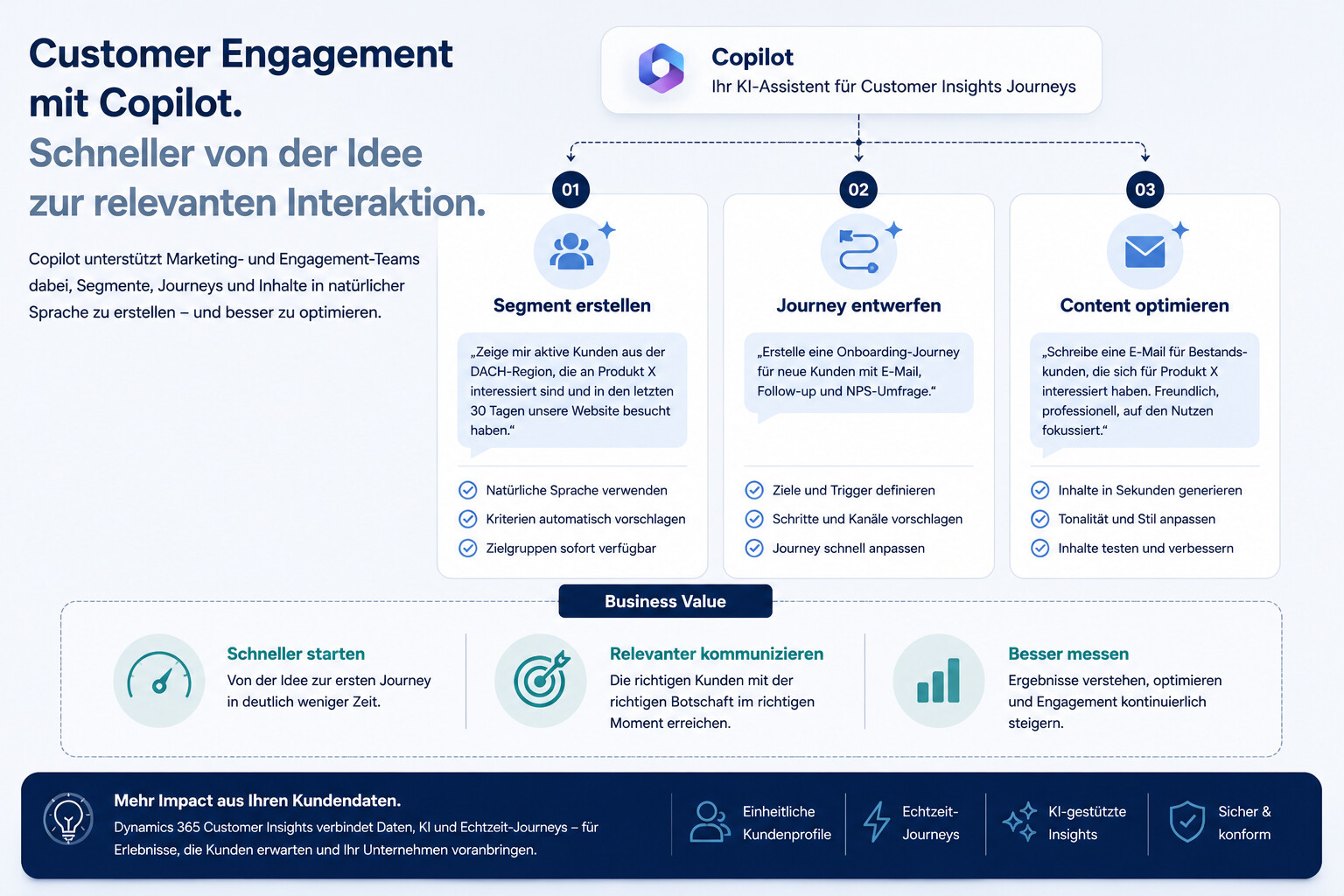
An important lever lies in Copilot. Many marketing and customer engagement teams lose time creating segments, emails, and journeys. They know which target group they want to reach, but they have to map this logic in a technically clean way. Copilot can speed up this process.
Microsoft describes in Copilot features in Customer Insights Journeys that users can describe goals in natural language to create real-time journeys, define audience criteria, and generate emails based on bullet points, tonality, or topic. Copilot can also help revise content and recommend images that match the message.
This changes the way we work. Teams don’t have to start with a blank interface at every step. You can create designs, test variants, and structure journeys faster. People remain responsible for strategy, tonality, approval and quality. However, Copilot reduces the effort between idea and implementation.

Real-time journeys instead of static campaigns
Many classic campaigns work according to a fixed plan. A target group is defined, an e-mail is sent, and then further steps follow. This can work, but it is often too rigid. Customers do not react according to the campaign calendar, but according to their own situations, interests and times.
Real-time journeys solve this problem because they are more responsive to signals and behavior. In Create custom triggers in Customer Insights Journeys , Microsoft describes custom triggers as a way to capture key moments and interactions and build customer journeys on top of them. A trigger can represent almost any relevant customer action.
This is particularly valuable for companies if customer engagement is not only to consist of newsletters. A customer downloads a white paper. An existing customer is approaching a contract extension. A contact attends an event. An account shows repeated interest in a particular topic. Such signals can lead to targeted next steps.
Outbound Marketing Is Over: Why the Change Is Relevant
Another reason to look into customer insights journeys is the change at Microsoft itself. The former outbound marketing module was removed in May 2026. Microsoft explains in Notes about outbound marketing removal that Dynamics 365 Customer Insights Journeys used to include an additional outbound marketing module, but that module was removed in May 2026.
This is more than a technical change. It shows where Microsoft is developing the product: away from classic outbound marketing, towards real-time journeys, data activation and AI-supported orchestration. Companies that still think strongly in terms of old campaign logics should therefore check whether their customer engagement processes are still fit for the future.
Switching doesn’t simply mean transferring old emails to a new module. It’s about rethinking journey logic, segments, triggers, data sources, and performance measurement. Anyone who only looks at this change from a technical point of view is wasting potential.
How companies use customer insights wisely
Getting started shouldn’t start with a big platform discussion. It is better to ask a clear question: Which customer experience should be improved? Only then should data sources, segments and journeys be planned.
A good starting point can be a concrete journey that is still manual or imprecise today. For example, lead nurturing after an event, reactivating inactive contacts, onboarding new customers, renewal communication or follow-up after service interactions. The use case should be relevant enough to have an impact, but clear enough to be implemented quickly.
| Step | Objective |
|---|---|
| Define | Select a specific customer engagement issue. |
| Check | Clarify which customer information is relevant to the journey. |
| Build | Define target groups based on real characteristics and signals. |
| Set | Use relevant customer actions as starting points. |
| Shape | Clearly structure communication, channels and handovers. |
| Measure | Evaluate KPIs such as conversion, engagement, pipeline contribution, or retention. |
The most important point is the connection between data and action. A unified customer profile is valuable, but it’s activation in journeys that makes an impact. Conversely, a journey without a good database is often just a prettier campaign.
Why Customer Insights is Particularly Relevant for B2B
In B2B, customer engagement is often more complex than in B2C. Purchasing decisions take longer, multiple people are involved, and the relevant context lies in many systems. A single contact says little about the entire account. A form signal is rarely enough to evaluate a purchase intent.
Dynamics 365 Customer Insights can help here because it transforms data from different sources into a more comprehensive picture. Sales and marketing can better understand which accounts are active, which topics become relevant, and which contacts should be addressed in a journey.
This is particularly interesting for project-based companies. When sales, service, project management and finance work with different data, potential is often hidden. Customer insights can help to bring together signals from several areas and derive better customer engagement processes from them.

The role of AI: support, not autopilot
AI can significantly accelerate customer engagement. Copilot helps create journeys, segments, and content. Data models support profiles and personalization. Triggers enable faster responses to customer behavior.
Nevertheless, AI should not be understood as an autopilot. Especially in B2B, customer engagement needs professional control. Which target group is really relevant? What tonality suits the account? Which communication is helpful and which seems too automated? What data can be used for personalization?
The best results are achieved when AI accelerates operational work, but strategy, responsibility, and quality remain with the company. Dynamics 365 Customer Insights can support this work, but it doesn’t replace the clean definition of audiences, journeys, and business goals.
Conclusion: Customer engagement needs more than campaigns
Dynamics 365 Customer Insights is relevant because customer engagement is no longer a matter of individual campaigns. Companies need to understand customer data, recognize signals, and trigger appropriate interactions at the right moment.
The benefit is not only created by the product. It is created by connecting data, segments, real-time journeys, copilot and clear business goals. If you only see customer insights as a marketing tool, you are only using part of the potential. If you understand it as the basis for data-driven customer engagement, you can bring sales, marketing and service closer together.
Customer engagement becomes less static and more event-driven. No more: a campaign for many. Rather: relevant interactions based on real customer signals.
FAQ
What is Dynamics 365 Customer Insights?
Dynamics 365 Customer Insights is a Microsoft solution for data-driven customer engagement. It helps companies unify customer data, create segments, build real-time journeys, and personalize customer communications.
What is the difference between Customer Insights Data and Customer Insights Journeys?
Customer Insights Data focuses on unifying customer data and building customer profiles. Customer Insights Journeys uses this data to shape segments, triggers, communications, and real-time journeys.
What is Copilot’s role in Dynamics 365 Customer Insights?
Copilot helps teams create segments, emails, and real-time journeys. Users can describe goals in natural language and receive suggestions that they can review, adapt, and publish.
Why are real-time journeys important?
Real-time journeys are more responsive to customer behavior and relevant signals. This allows companies to communicate faster and more appropriately than with purely static campaigns.
Is Dynamics 365 Customer Insights only relevant for marketing?
No. Customer insights is strong in the marketing context, but the benefits go beyond that. Unified customer data and relevant signals can also support sales, service, and account management.
How do companies get started with customer insights?
A sensible start is a concrete use case, for example lead nurturing, event follow-up, customer onboarding or reactivation. After that, data sources, segments, triggers, journey logic, and KPIs are defined.
Why is data quality crucial for customer insights?
Without clean and connected customer data, segments remain inaccurate and journeys remain irrelevant. Data quality determines whether personalization is really helpful or only technically possible.