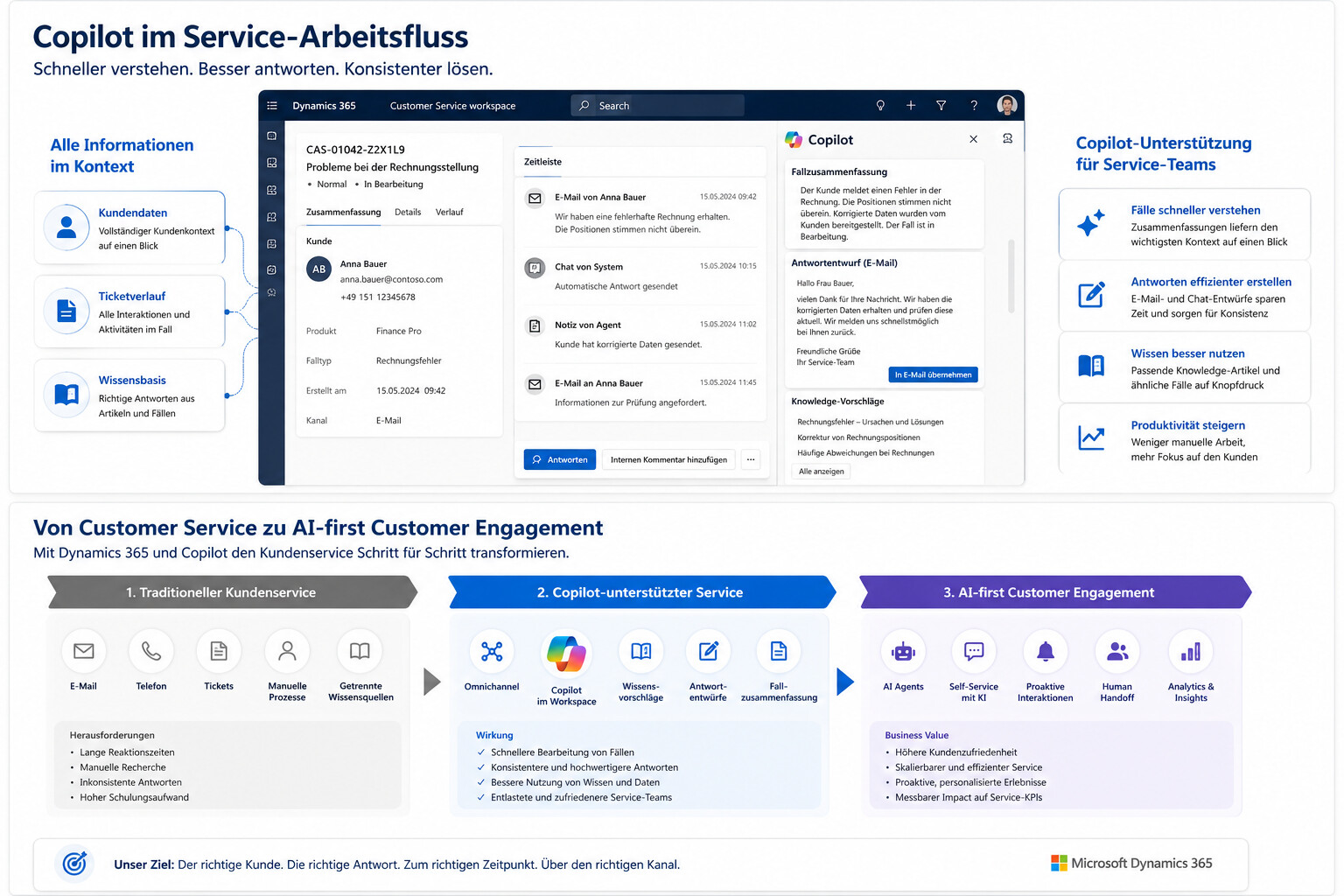
Customer service should become faster without appearing more impersonal. To achieve this, Microsoft brings AI directly into the desktop of service teams, helping employees understand cases, formulate responses, search for knowledge, and handle recurring requests.
The crucial point: Copilot does not replace the entire customer service. It improves specific work steps in the service process. Companies benefit above all if they do not view Copilot as a single AI feature, but as part of a clear service strategy.
What Dynamics 365 Customer Service Copilot does
Dynamics 365 Customer Service Copilot is designed to support service employees in their daily workflow. According to Microsoft Learn on Copilot features in Customer Service , employees with Copilot features enabled can answer questions, compose emails, design chat responses, and summarize cases and conversations.
This is particularly relevant because many service processes are still very manual today. Employees read long ticket histories, search for similar cases, review knowledge articles, formulate responses, and document results. Copilot starts exactly at these points. AI does not help in the abstract, but where time is lost in everyday service.
Screenshot placement: Directly after this section, a screenshot from the Copilot Service Workspace with the Copilot sidebar open is suitable. Thus, the reader immediately sees that it is not a separate tool, but support in the existing work context.
1. Understand cases faster with case summaries
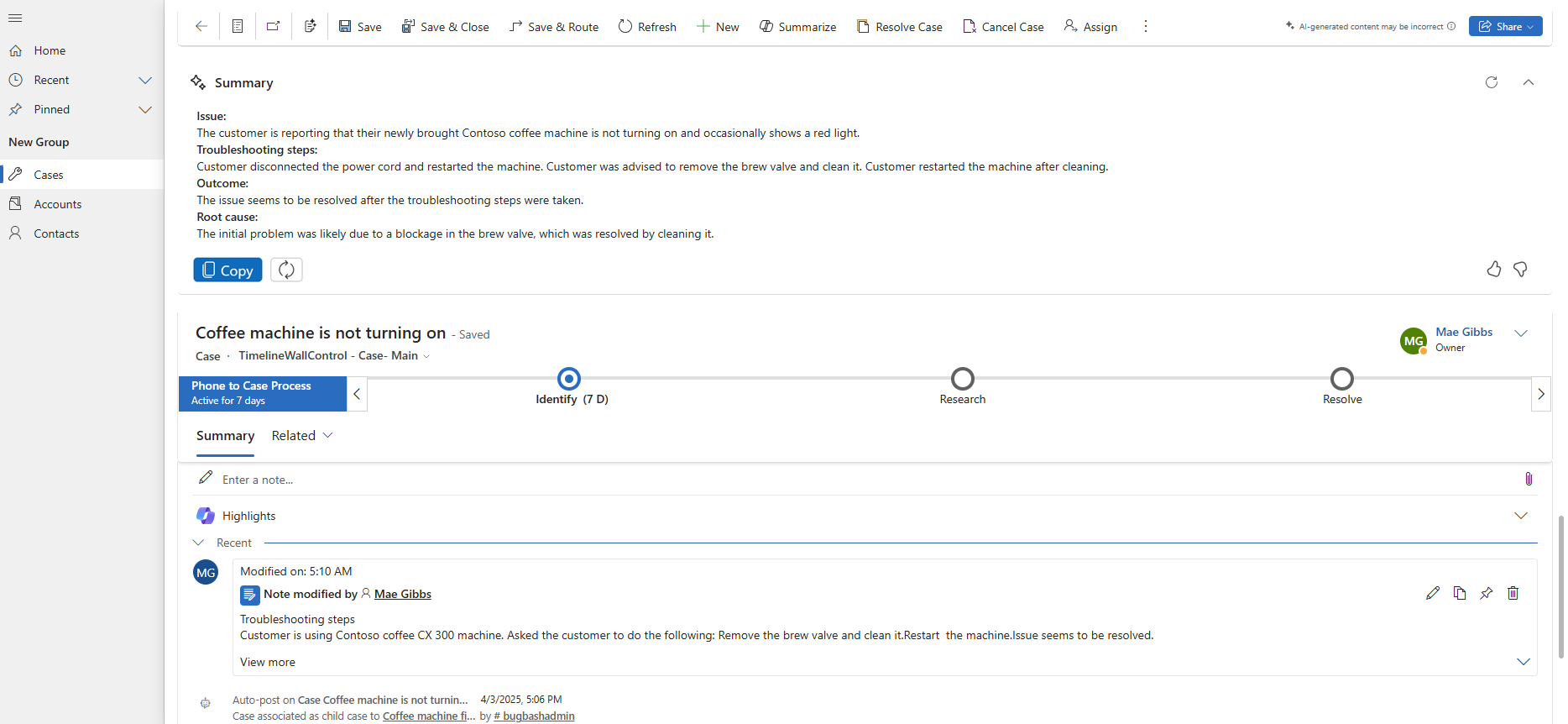
A common loss of time in customer service occurs when starting a case. Especially in the case of escalations, handovers or longer ticket processes, employees must first understand what has already happened. Copilot-generated case summaries can significantly shorten this process.
Microsoft describes in Use Copilot-generated case summaries that Copilot case summaries help to understand the context of a case more quickly and solve customer problems more efficiently. The summary includes key information such as case title, customer, subject, product, priority, case type, and description.
The benefit is not only in the time saved. Better summaries also reduce context loss. When a case is handed over to another person, they don’t have to manually reconstruct the entire history. This improves response times and reduces the risk of missing important details.
| Service Challenge | Potential through Copilot Case Summary |
|---|---|
| Long ticket journeys | Quick overview of the case context |
| Handovers between employees | Less information loss |
| Escalations | Faster understanding of critical points |
| New employees | Shorter familiarization with complex cases |
2. Formulate answers faster
A second major lever lies in communication. Service agents spend a lot of time formulating responses, transferring information from knowledge articles, and adapting messages to the right tone. Copilot can support draft responses for email and chat.
According to Microsoft Learn about Copilot features in Customer Service , Copilot can compose emails and design chat responses. In practice, this means that employees no longer start with an empty text field, but receive a suggestion that they can review, adapt and send.
This improves customer service in two places. First, the manual writing effort decreases. Secondly, answers become more consistent because employees can draw on existing knowledge and defined formulations. Nevertheless, the human examination remains important. Especially in the case of sensitive, contractual or complex requests, Copilot should not communicate unsupervised.
Screenshot placement: A good screenshot shows a draft email or chat reply suggestion in the Service Workspace. The focus should be on the interaction: request, copilot proposal, human processing.
3. Making knowledge from cases usable
Many companies do not have a knowledge problem, but a structural problem. The right answers exist somewhere in the company, but not always where service employees need them. Knowledge lies in old tickets, e-mails, documents or in the minds of individual employees.
Microsoft is working on exactly this interface. In Enable Copilot to suggest knowledge from cases , Microsoft describes a preview function that allows Copilot to suggest knowledge articles from solved cases. These suggestions can be reviewed, edited and then published as knowledge articles.
This is an important step, because knowledge management in service is often too slow. New problems are solved, but the knowledge does not systematically end up in the knowledge database. With Copilot, reusable knowledge can be generated more quickly from real service cases. This can improve service quality, especially in the case of recurring inquiries, product questions or standard processes.
The classification is important: This function is documented as a preview. Companies should therefore check which availability, license and admin requirements apply in their own tenant.

4. Find similar cases and knowledge articles faster
In addition to new knowledge articles, the search for existing knowledge is also crucial. Service agents need quick alerts to similar cases or relevant items without having to manually search multiple systems.
Microsoft describes in Enable AI suggestions for cases and knowledge articles that AI suggestions can be enabled for similar cases and knowledge articles. In the omnichannel view, employees can see similar cases during an ongoing customer interaction, which are dynamically updated based on the context of the conversation, according to the smart assist suggestions for knowledge articles and similar cases view.
The potential is high. Service teams don’t have to solve every problem from scratch. You can fall back on previous solutions, recognize patterns, and substantiate answers faster. This can make a significant difference, especially in the case of technical problems, recurring product questions or more complex B2B inquiries.
| Function | Practical benefits |
| Similar cases | Leverage previous solutions faster |
| Knowledge Article Suggestions | Find suitable answers without a long search |
| Dynamic update | Clues adapt to the context of the conversation |
| Smart Assist | Support directly during customer interaction |
5. Dynamics 365 Contact Center and AI Agents
Dynamics 365 Customer Service Copilot is not to be considered in isolation. Microsoft is developing its service portfolio more strongly in the direction of contact centers, omnichannel and AI agents. This is particularly relevant for companies that map service not only via e-mail or tickets, but also via chat, voice, messaging and other channels.
In the Dynamics 365 Contact Center 2026 Release Wave 1 , Microsoft describes new and planned features for Dynamics 365 Contact Center in the period April through September 2026. In the planned functions, Microsoft mentions Copilot and AI innovations, among others, which are intended to accelerate solutions to customer concerns and increase customer satisfaction. The What’s new and planned for Dynamics 365 Contact Center page lists specific areas such as Quality Evaluation Agent, Real-time Translation and other contact center functions.
This creates a new opportunity for companies: AI can not only support employees, but also make service processes smarter across channels. An AI agent can take simple requests, request information, support self-service, or prepare cases before a human takes over. However, the greatest benefit only arises when these agents are integrated into customer data, knowledge base, routing and escalation processes.
Screenshot placement: A screenshot or graphic that shows the difference is a good idea: isolated bot on the one hand, integrated contact center model with copilot, CRM, knowledge base and human handoff on the other.
6. Innovations in 2026: Why Microsoft is thinking more AI-first in terms of service
The Dynamics 365 Customer Service 2026 Release Wave 1 clearly shows where Microsoft is headed. Customer Service is being positioned more strongly as an AI-first service solution. Copilot is intended to help employees find resources faster, process cases more efficiently and automate time-consuming tasks.
For companies, the individual function is less decisive. More important is the direction: Microsoft is increasingly shifting AI into the standard processes of business applications. AI is not seen as a separate add-on, but as part of the daily work in service.
This has strategic consequences. Companies that are already using Dynamics 365 Customer Service should check which Copilot features can be activated in the short term. Organizations that are still working with disparate service tools, manual workarounds, or unstructured knowledge sources should first prepare their service base. Otherwise, Copilot will remain below his potential.
Concise strategy: How companies get off to a sensible start
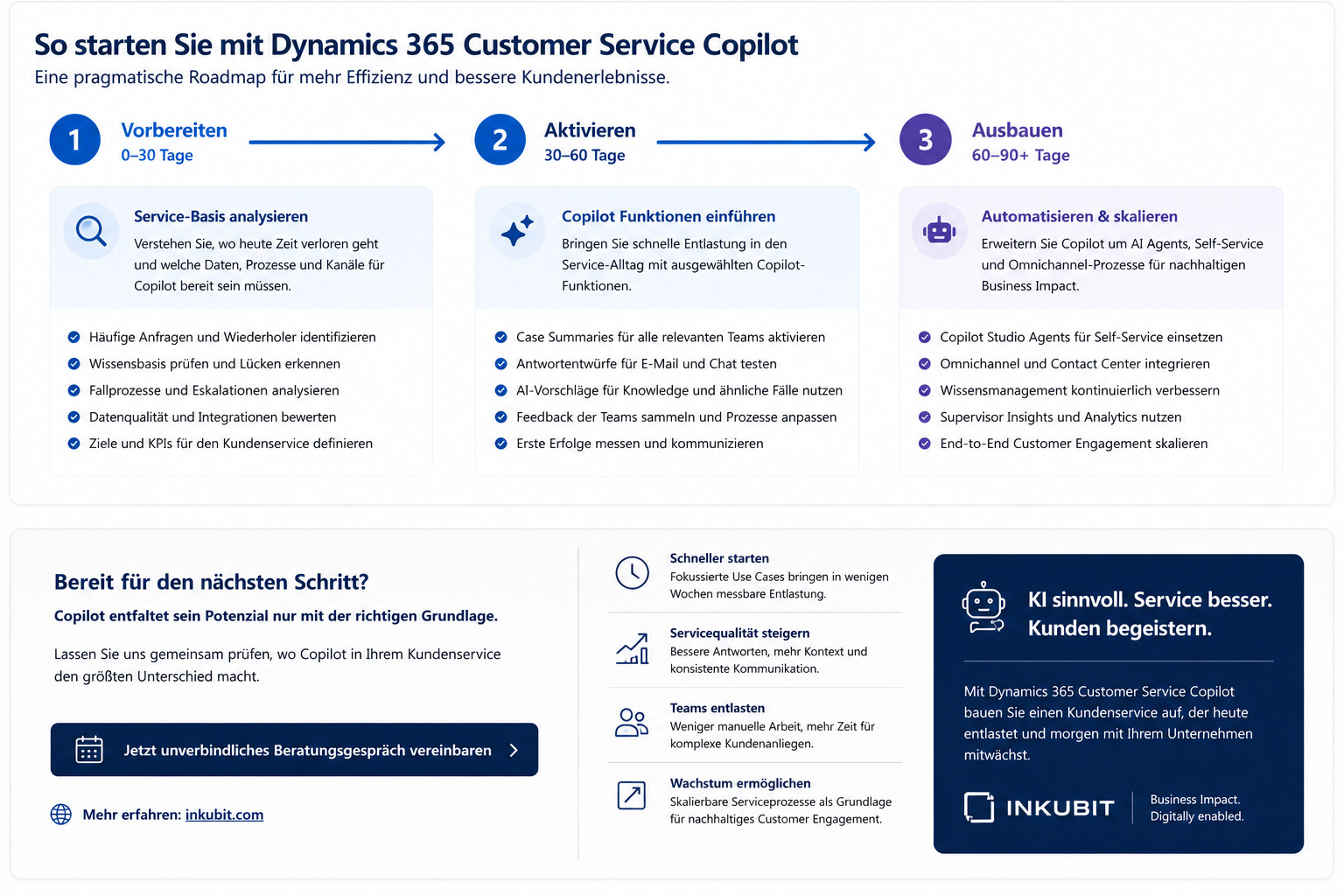
Getting started shouldn’t start with the question of which AI function is the most exciting. A brief service analysis is better: Where do employees lose time today? Which requests are repeated? Where are clear answers missing? Which cases are often escalated? And what data or sources of knowledge does Copilot need to provide meaningful support?
A pragmatic start can be made in three steps.
| Step | Focus | Objective |
| 1. Check | Analyze cases, knowledge base, channels, processes and escalations | Create clarity where Copilot brings the most benefit |
| 2. Activate | Test case summary, draft answers, knowledge search and similar cases | Create quick relief for service employees |
| 3. Expand | Integrate AI agents, self-service, contact centers, and knowledge processes | Enable scalable customer engagement |
This order is important. When companies start directly with AI Agents without clarifying data, knowledge and handovers, often only one more channel is created. If they improve operational service work first, they can achieve value faster and then automate in a targeted manner.

What requirements companies should consider
Copilot only unfolds its value if the basics are right. This includes clean customer data, well-maintained knowledge articles, clear authorizations, defined service processes, and an understanding of when AI suggestions need to be reviewed.
Microsoft itself points out requirements for Copilot functions. In Manage Copilot features in Customer Service , Microsoft describes, among other things, that Copilot features must be enabled by administrators. Depending on the role, licenses, roles, region, and configuration can play a role.
For companies, this means that technical activation is only part of the work. Professional preparation is just as important. Service teams need clear rules about when to use Copilot, how to review results, and how to feed feedback back into the knowledge base.
Potential for customer service
The business value of Dynamics 365 Customer Service Copilot comes primarily from better workflows. Employees understand cases faster, write answers more efficiently, find knowledge more easily and can deal with recurring concerns more consistently. At the same time, the basis for further automation is being created.
The potential lies in five areas in particular:
| Area | Results |
| Productivity | Less manual research and paperwork |
| Quality of | more consistent responses and better case context |
| Induction | faster orientation for new employees |
| Knowledge Management | Harness more knowledge from real-world cases |
| Scaling | Laying the foundation for AI agents and self-service |
The most important point is that Copilot is not a substitute for good service processes. It makes good processes faster and bad processes more visible. Companies should therefore not only activate the function, but also consciously design the service process around Copilot.
Conclusion: Copilot improves customer service where work really happens
Dynamics 365 Customer Service Copilot is relevant because Microsoft integrates AI directly into everyday service life. Case summaries, draft answers, knowledge proposals, similar cases and AI agents start with concrete work steps. As a result, AI can make customer service not only faster, but also more structured.
However, the greatest benefit does not come from activating individual features. The decisive factor is how well Copilot interacts with data, knowledge, processes and employees. Companies that want to improve their customer service with Microsoft AI should therefore not start with a bot. You should start where service teams are losing time today and customers are waiting too long for clear answers.
Dynamics 365 Customer Service Copilot offers a concrete way to do this: less manual work, better use of knowledge, and a service model that can gradually grow towards AI agents and intelligent customer engagement.
FAQ
What is Dynamics 365 Customer Service Copilot?
Dynamics 365 Customer Service Copilot is an AI support for service employees in Microsoft Dynamics 365 Customer Service. Copilot helps with summarizing cases and conversations, answering questions, designing emails and chat responses, and leveraging knowledge in the service process, among other things.
What are the benefits of Copilot in customer service?
Copilot can reduce the burden on service teams by making case context available faster, creating draft responses, suggesting relevant knowledge articles, and making similar cases discoverable. This allows requests to be processed faster and more consistently.
Does Dynamics 365 Customer Service Copilot replace service employees?
No. Copilot supports employees in specific tasks, but does not replace responsibility, testing and relationship skills in customer service. Especially in complex, sensitive or escalated cases, human control remains important.
What is the difference between Dynamics 365 Customer Service and Dynamics 365 Contact Center?
Dynamics 365 Customer Service focuses on case processing, service processes, knowledge management, and employee support. Dynamics 365 Contact Center extends this approach further into omnichannel communication, contact center capabilities, voice, messaging, and cross-channel service experiences.
Which Copilot features are good to get you started?
Case summaries, draft responses for email and chat, knowledge article suggestions, and similar cases are particularly suitable for getting started. These functions are directly linked to existing service processes and can quickly relieve operational relief.
What requirements does Copilot need in customer service?
Companies need well-maintained customer data, a usable knowledge base, clear service processes, appropriate authorizations and an activated Copilot configuration. Depending on the role, license, role, region, and admin requirements may apply.
How do companies get started with Dynamics 365 Customer Service Copilot?
A sensible start is an analysis of the most common service requests, the current knowledge base, case processing and escalation processes. Copilot functions can then be activated in a targeted manner and evaluated against specific service goals.