Autonumbering for Dynamics 365

Sequential numbers for maximum efficiency and order in Dynamics 365

Geschäftsführer Kai Gutzeit bei INKUBIT Managing Director Portrait

Kai Gutzeit

Your Contact Person

You can reach us at any time, around the clock. We would be happy to arrange a personal appointment with you.

More order and traceability through dynamic numbering systems

With our autonumbering solution for Dynamics 365 , you can automate the assignment of clearly structured, sequential numbers for your records. This solution makes it easier to ensure consistency and improve the traceability of data across different business units.

Main functions:

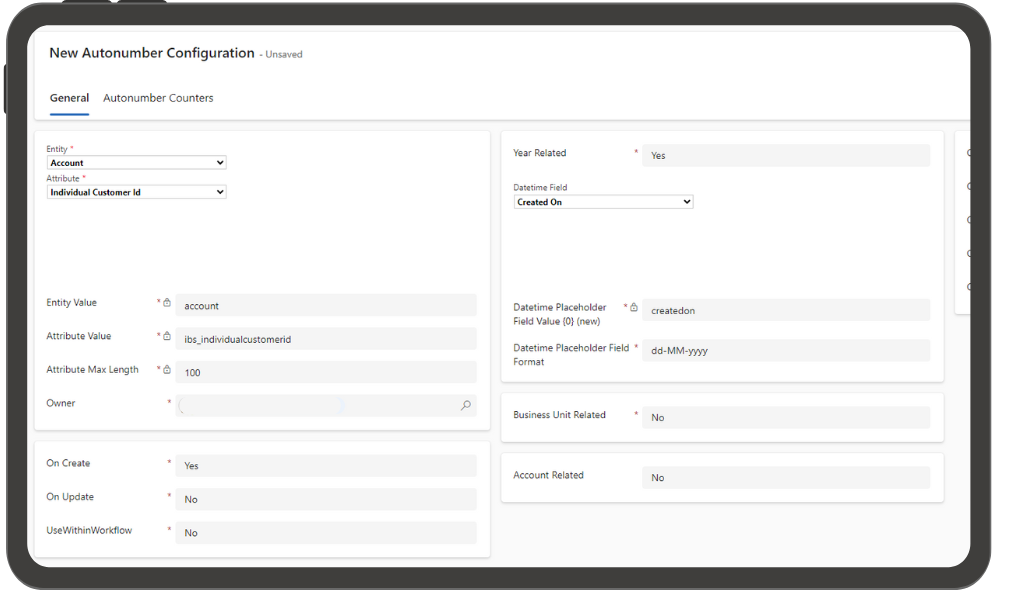
  • Individual counter formats: Define custom numbering sequences for different entities such as opportunities, contacts , and invoices. You can use unique formats such as INV-001, INV-002 or OPP-01 to easily distinguish records.
  • Date embedding: Integrate date information in different formats (e.g. MM-JJ) into your numbering sequences to better organize date-dependent records.
  • Business Unit & Account Information: Include business unit or account information in the autonumbering to clearly categorize records based on jurisdiction.
  • High adaptability: Set custom prefixes, suffixes , and number lengths . Start counters at any number to easily customize your existing data structures.
  • Annual counter reset: Enable counters that reset annually to enable easy tracking of year-specific records such as contracts or customer interactions.
  • Flexible when creating or updating: Specify that autonumbering is triggered when a record is created or updated to have full control over the number assignment.
  • Seamless workflow integration: The solution can be easily integrated into existing workflows and can be used in processes such as automatic numbering of sales orders, customer tickets, or invoices.
The benefits of autonumbering for Dynamics 365 for your business

Automated numbering: The manual assignment of ID numbers is completely eliminated. With the autonumbering solution, sequential numbers are automatically generated, which reduces effort and eliminates sources of error.

Customizable number formats: You can create custom number formats to suit your business needs. Whether prefixes, suffixes, years or specific meter lengths – everything can be flexibly adjusted.

Improved traceability: Unique, sequential numbers make records easy to find and trace. Especially in the case of invoices, sales opportunities or customer support cases, identification is significantly simplified.

What can autonumbering for Dynamics 365 do for
your business?

More order and structure

By uniformly numbering records such as opportunities, invoices or contacts, your database always remains clearly structured. This allows you to keep track of everything at all times and track data records quickly.

Time savings

The solution saves valuable time by eliminating the need to manually enter numbers. Employees can focus on more important tasks because numbering happens automatically in the background.

Easy integration into existing workflows

The autonumbering solution easily integrates with your existing Dynamics 365 workflows , so that numbering happens automatically when a record is created or updated.

Instant insights through language processing

Accelerate audience segmentation and targeting through natural language processing

Dynamic Autonumbering Solution for Microsoft Dynamics 365

Automated, consistent identification for seamless data management

With versatile customization options, you can use prefixes, date formats, and custom counters to tailor the solution to your exact business needs. The intuitive user interface allows for easy deployment and management across all relevant entities, supporting streamlined data consistency and management across your system.

Rich customer data for targeted interactions

Improve your customer approach in a targeted manner by enriching customer data in a simple and contextual way

Efficiently customize and manage data structures in Dynamics 365

Flexible customization for individual business needs

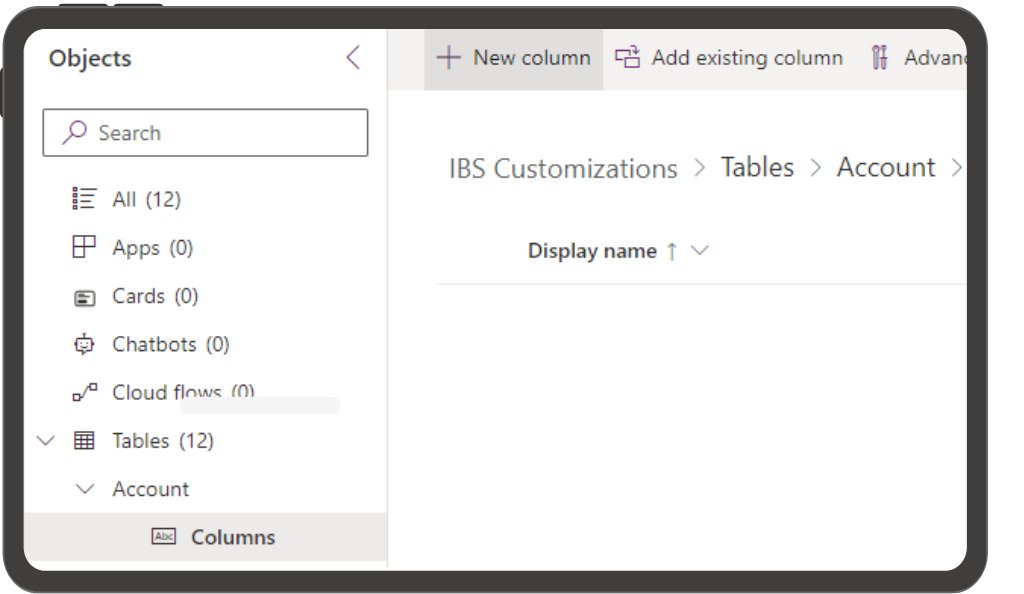
Our autonumbering solution integrates seamlessly with Dynamics 365 and provides an easy-to-use interface to manage your data structures. With a few clicks, new columns and fields can be added or existing ones can be customized to meet specific business needs. Autonumbering ensures consistent, unique identifiers while you retain full control over your data. Optimize your database and increase the efficiency of your work processes.

Learn how Dynamics 365 can help your organization increase efficiency, increase profitability, and make better decisions

Want to harness the power of Dynamics 365 for your business? Contact us today to learn how the platform can drive innovation and transformation for your business.