Artificial intelligence is in the process of fundamentally changing the world of work – and not at some point, but now. Many companies are already using the new Copilot features in Microsoft 365. But these integrated helpers are only the beginning of “Enterprise AI”. You can find out what this is and how to achieve this status in our blog article!
The real strength lies in scaling: When AI not only supports the formulation of e-mails, but also analyzes entire processes, prepares decisions and acts automatically. Microsoft offers a well-thought-out technology stack for this – from Copilot to the Power Platform to Azure AI.
What is Enterprise AI?
Enterprise AI refers to the strategic use of artificial intelligence in business processes to solve complex problems, automate decisions, and increase overall business efficiency. Unlike simple AI applications that focus on specific tasks such as image recognition or speech processing, enterprise AI integrates AI technologies comprehensively throughout the enterprise. The aim is to establish AI not only selectively, but as an integral part of corporate decision-making, operations and innovation.
Core features of Enterprise AI:
-
Integration into business processes: Enterprise AI is embedded directly into business processes, from automating routine tasks to supporting decisions in complex scenarios.
-
Scalability: Solutions are designed to grow with the business and adapt to changing market conditions, making them ideal for use in large, dynamic organizations.
-
Data-driven: At the heart of enterprise AI is the use of big data to recognize, predict, and optimize patterns. This involves processing and analyzing real-time data streams from various internal and external sources.
-
Learning ability: AI models in enterprise applications continuously learn and improve autonomously to respond more effectively to new challenges and opportunities.
-
Ethics and Governance: Due to their extensive influence, Enterprise AI solutions also include strict ethics and data governance policies to ensure security, privacy, and fair practices.
By using enterprise AI, companies strive not only to improve their efficiency and productivity, but also to develop a deeper understanding of their customers and offer innovative products and services that set them apart from the competition
Get started with Copilot – AI directly in Microsoft 365
With Copilot, you get AI capabilities right in the tools you use every day anyway:
-
Outlook: Automatic reply suggestions and prioritization of emails
-
Teams: Intelligent meeting summaries and to-do creation
-
Word & Excel: Generate texts, analyze tables, write reports
-
PowerPoint: Summarize content and prepare it visually
Pros:
-
Built-in
-
No additional investments
-
Rapid efficiency gains in everyday work
But: The scope for design is limited. You can’t integrate company-specific processes or data sources – that’s what you need to take to the next step.
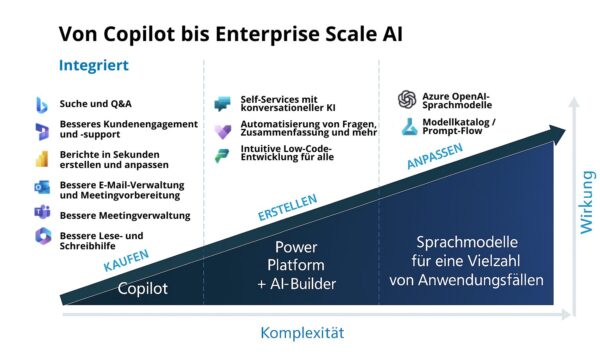
Power Platform + AI Builder – The Next Step to Custom Automation
With the Power Platform (Power Automate, Power Apps, Power BI) and the AI Builder, you can expand your AI capabilities:
-
Chatbots with Power Virtual Agents to Relieve Your Support
-
Document recognition and analysis with AI models
-
Process automation with Power Automate powered by AI
Example:
A sales team can automatically classify, prioritize, and route requests to the right contact person – without manual intervention.
Pros:
-
Individual use cases
-
Low-code/no-code – also for specialist departments
-
Seamless integration with Microsoft 365 and Dynamics 365
Enterprise AI with Azure OpenAI & LLMs
For more complex scenarios with higher requirements for scale, security, and flexibility, Azure OpenAI provides access to advanced Large Language Models (LLMs) such as GPT.
Possible use cases:
-
Internal knowledge bases with natural language search
-
Automated text analysis of large amounts of data
-
Own AI models for specific specialist areas
Tools such as Prompt Flow and the Model Catalog enable structured development, testing, and deployment of AI models – all within the Microsoft Azure environment.
Pros:
-
High scalability
-
Use of internal company data
-
Full control over governance and data protection
Looking to start or expand your AI journey?
INKUBIT supports you every step of the way – from Copilot implementation to automation with Power Platform to your individual Azure AI strategy. Together, we implement intelligent solutions with real added value for your company.