With its latest release wave, Microsoft is not only delivering technical innovations but also practical solutions to common challenges in project management: status reports, approvals, and capitalization—all of which are now more structured, automated, and significantly more intuitive.
If you’re already using Dynamics 365 Project Operations, now is the perfect time to assess: Which features specifically help lighten your teams’ workload? Which new features can be quickly enabled to immediately improve clarity, efficiency, and control in your day-to-day operations?
Release Timeline at a Glance
| Milestone | Date |
|---|---|
| 📑 Release Schedule | July 16, 2025 |
| 🧪 Early Access (Preview) | August 4, 2025 |
| 🚀 General availability | October 1, 2025 |
Top 10 Features in Dynamics 365 Project Operations (Wave 2 2025)
Copilot automatically generates project status reports
What's new?
An AI-powered copilot automatically generates project status reports based on tasks, progress, risks, and milestones—without any manual summarization.
🔷 Why is this relevant for your business?
Project managers save valuable time, and executives receive transparent, consistent status updates at a glance. Ideal for reporting, steering, and alignment.
Automatic assignment of credit card payments to expenses
What's new?
Credit card transactions are automatically reconciled with the corresponding expense receipts—using AI and receipt data.
🔷 Why is this relevant for your business?
No more manual allocation. Monthly closings become faster, more accurate, and less prone to errors.
Mobile Expense App – Phases 3 & 4
What's new?
The expense app is getting an upgrade: a new user interface, improved mobile features, and offline capability for greater user-friendliness.
🔷 Why is this relevant for your business?
Employees can record expenses faster—even on the go. This speeds up approvals and improves compliance.
Project fields with time zone logic & custom fields
What's new?
New enterprise fields enable consistent project time tracking across time zones. Additionally, custom fields can be used in project tracking.
🔷 Why is this relevant for your business?
This leads to fewer coordination issues, especially in international projects—reports and analyses become significantly more accurate.
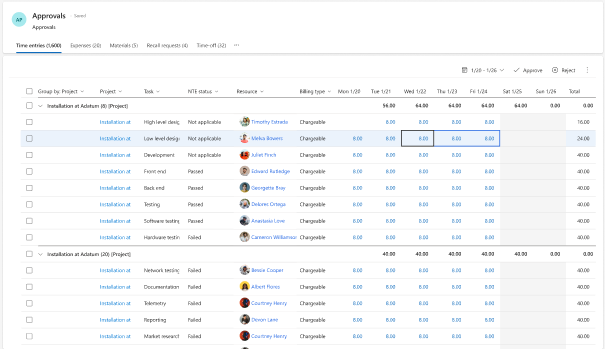
New user interface for project approvals
What's new?
The approval module now features a new, responsive UI. Approvals across different project types are now clearer and more flexible.
🔷 Why is this relevant to your business?
Decision-making processes are accelerated, and teams can better keep track of everything—without compromising on security or control.

In-stock items in project entries
What's new?
Stock items can now be integrated directly into project-related workflows—even for time-and-materials or fixed-price projects.
🔷 Why is this relevant to your business?
Hybrid models combining services and material costs are easier to map. This improves accuracy in costing, billing, and margin calculations.
Link capital projects directly to asset accounting
What's new?
Project costs can now be directly transferred to capitalization and asset management. Automatic elimination is also supported.
🔷 Why is this relevant for your business?
Less manual post-processing in financial accounting – greater clarity on investment projects and reduced risk when it comes to compliance issues.
Copy a project using a template & WBS
What's new?
Projects can be duplicated—including templates, WBS structures, and dependencies—with just a few clicks.
🔷 Why is this relevant for your business?
Perfect for recurring services: Saves setup time, promotes standardization, and increases planning reliability.
General journals for projects (not linked to inventory)
What's new?
In non-inventory-based scenarios, journal entries can now be posted directly to project accounts—without any special configuration.
🔷 Why is this relevant for your business?
Ideal for finance teams that want to work with precision without complex procurement processes—from controlling to accounting.
Migration from PMA to a modern architecture
What's new?
For clients still using PMA (Project Management & Accounting), there are new tools available to facilitate a structured migration to the modern Project Ops platform.
🔷 Why is this relevant to your business?
You’ll reduce technical overhead, improve performance, and secure access to future innovations.
When will you take advantage of your new benefit?
You’re already using Dynamics 365 Project Operations—but are you taking full advantage of all the new features?
Book a quick consultation with our team today—we’ll show you which features have the greatest impact on your processes and how to activate them effectively!