Customer service teams often use many tools at once, but rarely do so efficiently. Smart routing rules, copilot support, and optimized workspaces have been available for some time, but are often not used because getting started seems too complicated.
The new Dynamics 365 Customer Service release wave shows that Microsoft isn't just delivering new features, but is also addressing very specific challenges in day-to-day support—from AI-powered call routing to intelligent shift scheduling.
Why You Should Familiarize Yourself with the New Features Now
Especially if you’re already using Dynamics 365 Customer Service, now is a good time to take a closer look: Which of these new features are a good fit for your setup? And which ones can be enabled right away—without lengthy project planning?
Release Timeline at a Glance
| Milestone | Date |
|---|---|
| 📑 Release Schedule | July 16, 2025 |
| 🧪 Early Access (Preview) | August 4, 2025 |
| 🚀 General availability | October 1, 2025 |
Top 7 Features in Dynamics 365 Customer Service (Wave 2 2025)
Copilot recognizes conversation content and automatically summarizes calls
What's new?
Copilot can transcribe phone calls in real time, recognize the caller's tone and intent, and automatically summarize the key points—all without the need for manual notes.
🔷 Why is this relevant for your business?
Your service staff save valuable time, avoid transcription errors, and can focus fully on the conversation—Copilot automatically documents everything in the background.
Next best action: Copilot suggests suitable macros
What's new?
Based on previous interactions, Copilot analyzes the context of the case and suggests appropriate macros or follow-up actions at the right moment.
🔷 Why is this relevant for your business?
Fewer clicks, fewer searches—faster case processing. This allows you to achieve faster response times and consistent service experiences.
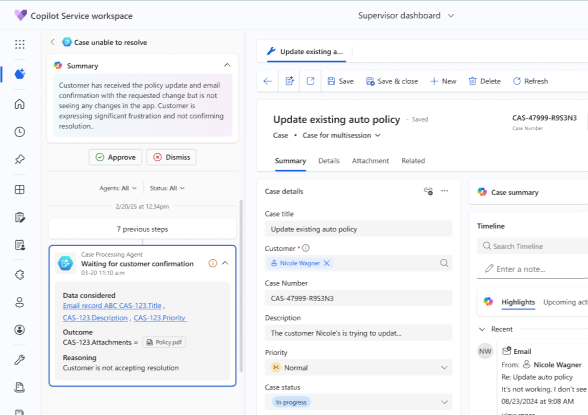

Smart Routing in Microsoft Teams Voice
What's new?
The Teams channel now recognizes the caller's intent and automatically routes the call to the appropriate person or group—based on availability and skill matching.
🔷 Why is this relevant for your business?
Wait times are reduced, and so is customer frustration. AI-driven call routing ensures that inquiries reach the right person more quickly.
AI-based routing with SLA control
What's new?
Unified Routing now uses AI-based rules to automatically assign cases—taking into account SLA targets, skills, and priorities.
🔷 Why is this relevant for your business?
Especially for more complex service organizations, this feature ensures fairer distribution, greater transparency, and faster responses to critical requests.
Shift Scheduling with AI – Based on Volume and Skills
What's new?
With the help of RSO (Resource Scheduling Optimization), shifts can be intelligently planned based on historical volumes, qualifications, and availability.
🔷 Why is this relevant for your business?
You reduce manual planning efforts and create fairer schedules—without Excel, without relying on gut feelings, directly within the system.
Improved multi-session view for agents
What's new?
The agent interface has been enhanced: improved keyboard shortcuts, case switching without loading times, and greater clarity thanks to visual alerts.
🔷 Why is this relevant for your business?
Especially when handling a high volume of cases, your service staff can maintain a clear overview and work noticeably more efficiently—without any inefficiencies.
When will you take advantage of your new benefit?
You're already using Dynamics 365 Customer Service—but are you taking full advantage of all the new features?
Book a quick consultation with our team today—we’ll show you which features have the greatest impact on your processes and how to activate them effectively!