This release wave not only brings technical advancements; it transforms the way reporting and data work are handled on a daily basis. Copilot generates initial reports directly from voice commands. Semantic models can be maintained in a more structured way. And Fabric connects external sources, pipelines, and alerts into a seamless data flow.
Now is the perfect time for companies already using Power BI or Fabric in production to explore these new features:
Which features specifically offer time savings, automation, or transparency—without complex implementation? Which of these can be enabled with just a few clicks and deliver immediate value?
Because one thing is clear: those who take their data strategy to the next level don’t start with technology, but with the targeted use of the right features.
Release Timeline at a Glance
| Milestone | Date |
|---|---|
| 📑 Release Schedule | July 16, 2025 |
| 🧪 Early Access (Preview) | August 4, 2025 |
| 🚀 General availability | October 1, 2025 |
Why You Should Familiarize Yourself with the New Features Now
Many of the new features can be activated immediately, without lengthy project timelines or external tools. Copilot, Data Activator, and the new modeling options, in particular, are designed to enhance—not replace—existing reports and workflows. At the same time, the underlying infrastructure is evolving: Those who start early to adapt their models or use OneLake shortcuts are laying the groundwork for scalability and governance. Those who wait will have to catch up later, with more effort and less strategic flexibility.
Now is the perfect time to take a closer look:
Which features provide real value for your business?
Which ones are easy to enable—and where should you take the next step?
Copilot for Power BI: Create reports using voice commands
What's new?
Copilot in Power BI generates initial visualizations and reports based on simple text prompts. Users describe what they want to analyze—Power BI generates suggestions that can be further customized.
🔷 Why is this relevant for your company?
Report creation is becoming more accessible—even for departments without in-depth Power BI expertise. This allows for faster generation of initial insights without the BI department having to process every request manually.
Direct Lake Mode: Fast access to large amounts of data
What's new?
In the future, Power BI will be able to access data in the lake directly—without needing to import it first. This improves performance for large models and noticeably reduces latency.
🔷 Why is this relevant for your business?
Especially when dealing with real-time data or large tables, reporting becomes not only faster but also requires less maintenance. This reduces loading times and increases user acceptance.
Improved semantic models in Power BI Desktop
What's new?
Power BI Desktop is getting more modeling features—such as the ability to separate calculation logic from visualization—for clearer, more maintainable reports.
🔷 Why is this relevant to your business?
More complex dashboards can be structured more clearly. This not only helps with development, but also with governance and sharing with other teams.
Data Activator: Reactive Dashboards with Automation
What's new?
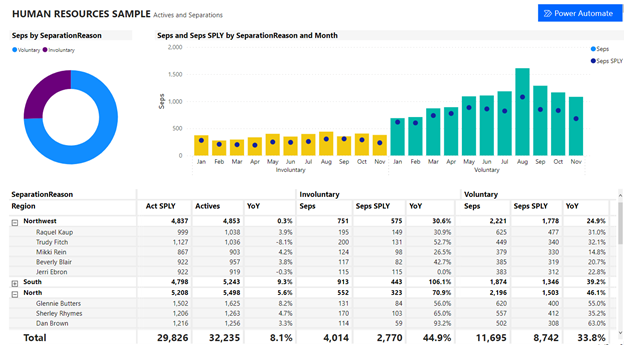
With Data Activator, you can trigger alerts and automated actions directly from Power BI data—such as emails, Teams messages, or processes in Power Automate.
🔷 Why is this relevant for your business?
Reports are transformed into actionable recommendations. Teams no longer need to check regularly—they are actively notified when thresholds are reached or exceeded.
Notebook-based pipelines for data flows
What's new?
Microsoft Fabric enables you to create data pipelines using Jupyter-like notebooks. This allows you to preprocess, transform, and orchestrate data—all within your Fabric environment.
🔷Why is this relevant for your business?
Data preparation is becoming more flexible and reproducible—especially for data engineers who use Python or Spark. This makes it easier to share data between teams and systems.
OneLake Shortcuts: Integrate Azure & AWS data sources directly
What's new?
With OneLake, you can integrate data from Azure Data Lake or AWS S3 using shortcuts—without copying or duplicating it. The data is immediately available for reports or AI models.
🔷 Why is this relevant for your business?
Less redundant data storage, faster integration of external sources—and greater control over data flow. This saves on storage costs and speeds up projects involving multiple platforms.
When will you take advantage of your new benefit?
You’re already using Microsoft Power BI or Fabric—but are you taking full advantage of all the new features?
Book a quick consultation with our team today—we’ll show you which features have the greatest impact on your processes and how to activate them effectively!