With the latest Power Automate release wave, Microsoft is once again pushing the boundaries of what automation can achieve—moving away from complicated workflows toward intelligent, dynamic solutions. Whether it’s Copilot-driven processes, optimized document recognition, or new insights into the Automation Center, the new features are clearly designed to deliver greater efficiency, transparency, and user-friendliness.
Now is the perfect time to reassess your automation strategy in Power Automate: Which tasks can be made even easier with generative AI or AI Builder? Where can you identify bottlenecks in your workflow—and resolve them immediately? And how can non-technical teams also benefit from these improvements? We’ve summarized the most important features for you.
Release Timeline at a Glance
| Milestone | Date |
|---|---|
| 📑 Release Schedule | July 16, 2025 |
| 🧪 Early Access (Preview) | August 4, 2025 |
| 🚀 General availability | October 1, 2025 |
Top 7 Features in Power Automate (Wave 2 2025)
Copilot creates automations on demand
What's new?
You can use natural language to create new flows in Power Automate and manage existing automated processes—without code and directly embedded in Microsoft 365.
🔷 Why is this relevant for your business?
Even non-technical teams can automate recurring tasks on their own. This saves IT resources and speeds up day-to-day processes.
Generative AI helps make decisions—in real time
What's new?
With generative AI, decision logic and workflow structures can be dynamically adapted within flows—based on the current context.
🔷 Why is this relevant to your business?
Your automation processes are becoming smarter and more adaptable—which is especially helpful for unpredictable or highly variable processes.
AI Builder processes documents with even greater precision
What's new?
The AI models for document recognition (e.g., for receipts, contracts, or forms) have been improved—for higher recognition rates and easier integration.
🔷 Why is this relevant for your business?
You’ll eliminate manual data entry, minimize errors, and speed up processes such as processing incoming invoices or onboarding procedures.
Process Map for a Comprehensive Overview of Processes
What's new?
An interactive process map shows how flows are connected, which steps are performed, and where handoffs occur.
🔷Why is this relevant for your business?
You can identify redundancies, risks, or inefficient branches at a glance—ideal for governance, scaling, and quality assurance.
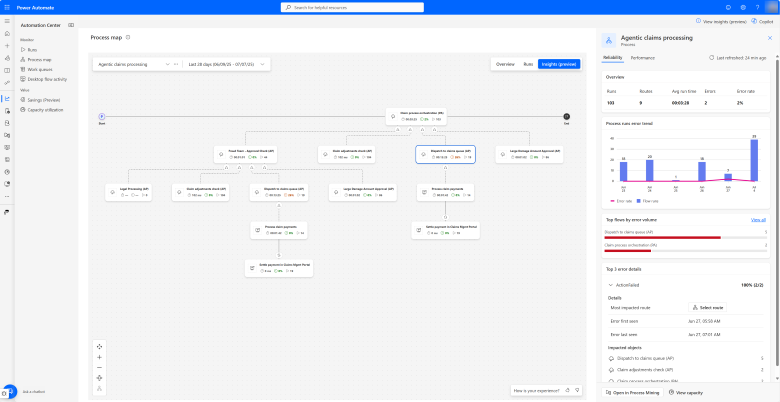

Process Mining directly in Automation Center
What's new?
Power Automate analyzes process data directly in the Admin Center—including bottlenecks, wait times, and optimization recommendations.
🔷 Why is this relevant for your business?
You can immediately see where your processes are getting stuck—without any additional tools or complicated exports.
Automation Center: Orchestration & Analytics
What's new?
The Automation Center consolidates cloud and desktop flows and offers new capabilities for management, monitoring, and analysis.
🔷 Why is this relevant for your business?
This helps you maintain a clear overview, especially for larger automation projects—regardless of the team, system, or platform.
ROI Analysis for Automation in the Admin Center
What's new?
A new view in the Admin Center shows how much time and effort has been saved through automation—visually presented using Power BI.
🔷 Why is this relevant for your business?
You can finally demonstrate exactly which automations are worthwhile—and where there is further potential.
When will you take advantage of your new benefit?
You're already using Microsoft Power Automate—but are you taking full advantage of all the new features?
Book a quick consultation with our team today—we’ll show you which features have the greatest impact on your processes and how to activate them effectively!