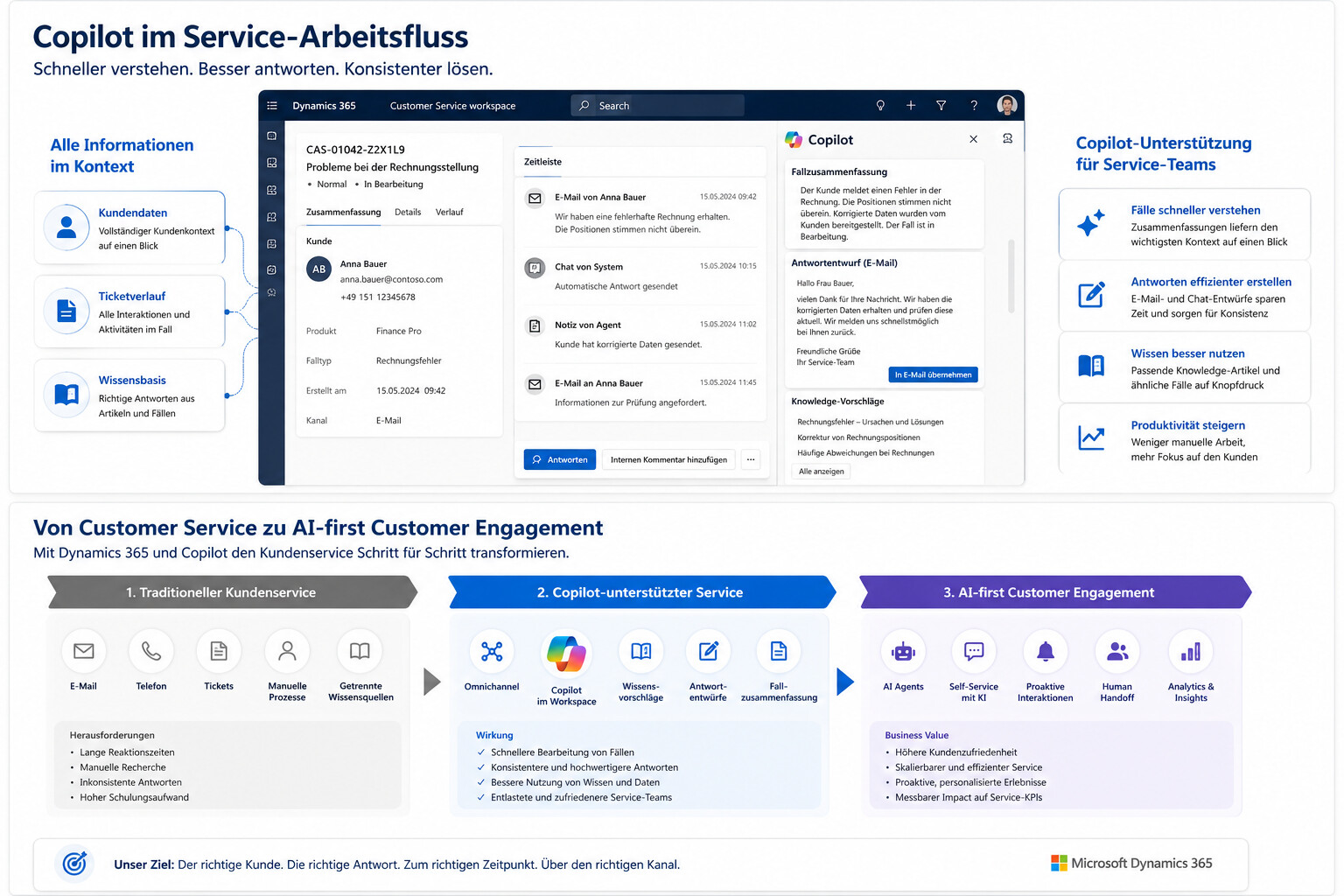
Customer service should become faster without seeming more impersonal. To achieve this, Microsoft is integrating AI directly into the Service Teams interface and helping employees understand cases, formulate responses, search for information, and handle recurring inquiries.
The key point: Copilot does not replace the entire customer service operation. It improves specific steps in the service process. Companies benefit most when they view Copilot not as a standalone AI feature, but as part of a clear service strategy.
What Dynamics 365 Customer Service Copilot Does
Dynamics 365 Customer Service Copilot is designed to support service agents in their daily workflows. According to Microsoft Learn on Copilot features in Customer Service , employees with Copilot features enabled can answer questions, compose emails, draft chat responses, and summarize cases and conversations.
This is particularly relevant because many service processes today are still largely manual. Employees read through lengthy ticket histories, search for similar cases, review knowledge base articles, draft responses, and document results. Copilot steps in exactly at these points. The AI doesn’t provide abstract assistance; rather, it helps where time is lost in day-to-day service operations.
Screenshot Placement: Immediately following this section, include a screenshot from the Copilot Service Workspace showing the Copilot sidebar open. This way, the reader can immediately see that it is not a separate tool, but rather a feature that provides support within the existing work environment.
1. Understand Cases Faster with Case Summaries
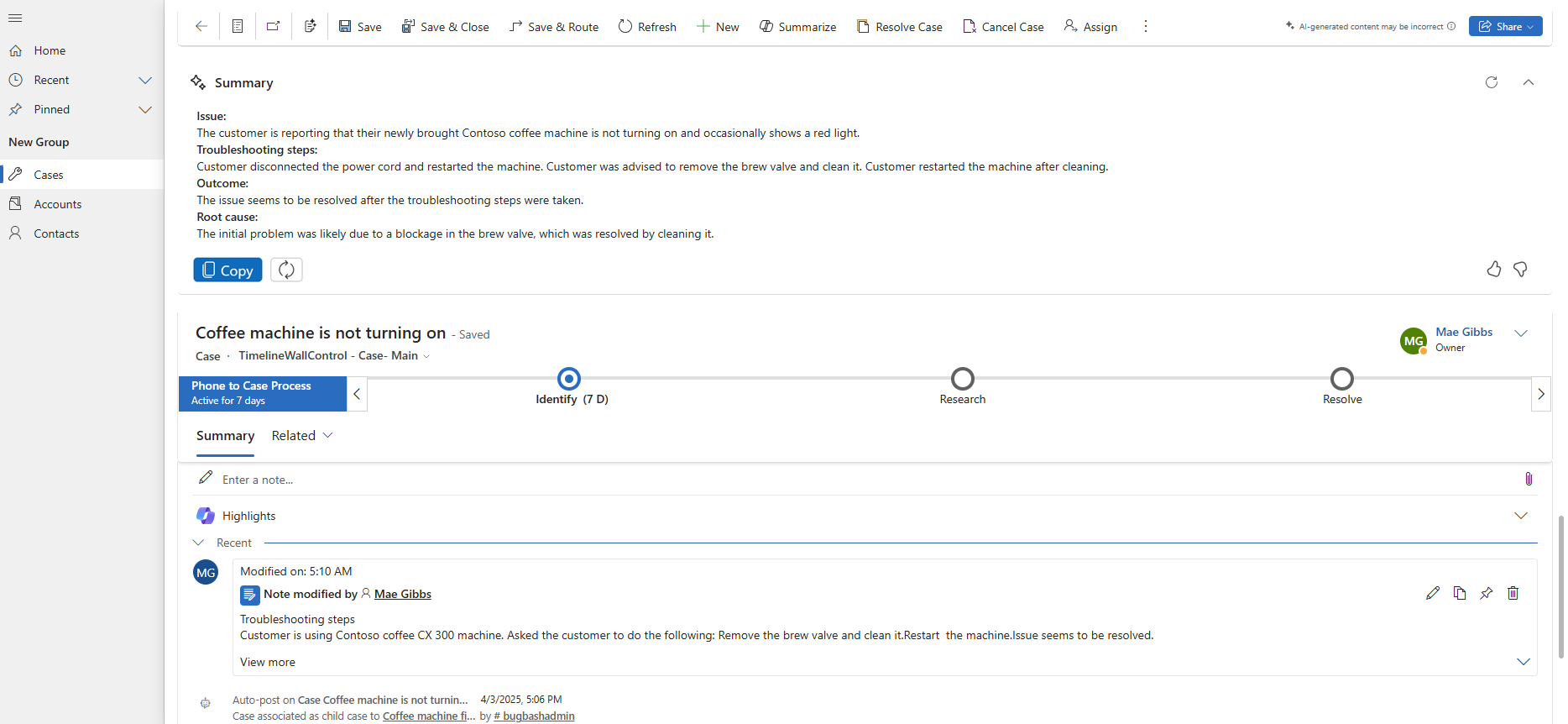
A common source of time wasted in customer service occurs when an agent first takes on a case. Especially in cases of escalations, handoffs, or lengthy ticket threads, agents must first understand what has already happened. Copilot-generated case summaries can significantly shorten this process.
Microsoft describes in "Use Copilot-Generated Case Summaries", Copilot Case Summaries help you understand the context of a case more quickly and resolve customer issues more efficiently. The summary includes key information such as the case title, customer, subject, product, priority, case type, and description.
The benefits go beyond just saving time. Better summaries also minimize the loss of context. When a case is handed off to another person, that person does not have to manually reconstruct the entire history. This improves response times and reduces the risk of important details being overlooked.
| Service Challenge | Potential Through Copilot: Case Summary |
|---|---|
| Long Ticket Histories | A quick overview of the case context |
| Handoffs Between Employees | less loss of information |
| Escalations | faster understanding of critical points |
| New Employees | shorter learning curve for complex cases |
2. Formulate answers more quickly
A second major area for improvement is communication. Service representatives spend a lot of time drafting responses, extracting information from knowledge base articles, and ensuring their messages strike the right tone. Copilot can help by providing draft responses for email and chat.
According to Microsoft Learn on Copilot features in customer service , Copilot can compose emails and draft chat responses. In practice, this means that employees no longer start with a blank text field but instead receive a suggestion that they can review, edit, and send.
This improves customer service in two ways. First, it reduces the amount of manual typing required. Second, responses become more consistent because employees can draw on existing knowledge and predefined phrasing. However, human review remains essential. Especially when dealing with sensitive, contractual, or complex inquiries, Copilot should not be allowed to communicate unsupervised.
Screenshot Placement: A good screenshot shows a draft email or suggested chat response in the Service Workspace. The focus should be on the interplay between the request, the Copilot suggestion, and human review.
3. Putting Knowledge from Cases to Use
Many companies don’t have a knowledge problem—they have a structural problem. The right answers exist somewhere within the company, but not always where service employees need them. Knowledge is tucked away in old tickets, emails, documents, or in the minds of individual employees.
Microsoft is working on this very interface. In "Enable Copilot to Suggest Knowledge from Cases" , Microsoft describes a preview feature that allows Copilot to suggest knowledge articles based on resolved cases. These suggestions can be reviewed, edited, and then published as knowledge articles.
This is an important step because knowledge management in customer service is often too slow. New problems are solved, but the knowledge isn't systematically added to the knowledge base. With Copilot, reusable knowledge can be generated more quickly from real service cases. This can improve service quality, especially for recurring inquiries, product questions, or standard processes.
It is important to note that this feature is documented as a preview. Companies should therefore check which availability, licensing, and administrative requirements apply in their own tenant.

4. Find similar cases and knowledge articles faster
In addition to new knowledge articles, the ability to search for existing knowledge is also crucial. Service representatives need quick access to information on similar cases or relevant articles without having to manually search through multiple systems.
Microsoft describes in "Enable AI Suggestions for Cases and Knowledge Articles"that AI suggestions for similar cases and knowledge articles can be enabled. In the omnichannel view, employees can, according to View smart assist suggestions for knowledge articles and similar cases , employees can view similar cases during an ongoing customer interaction, which are dynamically updated based on the conversation context.
The potential is great. Service teams don't have to figure out every problem from scratch. They can draw on past solutions, identify patterns, and provide well-informed answers more quickly. This can make a significant difference, especially when dealing with technical issues, recurring product questions, or more complex B2B inquiries.
| Function | Practical Benefits |
| similar cases | Put previous solutions to use more quickly |
| Suggestions for Knowledge Base Articles | Find the right answers without having to search for a long time |
| dynamic update | Prompts adapt to the context of the conversation |
| Smart Assist | Support provided directly during customer interactions |
5. Dynamics 365 Contact Center and AI Agents
Dynamics 365 Customer Service Copilot should not be viewed in isolation. Microsoft is increasingly shifting its service portfolio toward contact centers, omnichannel solutions, and AI agents. This is particularly relevant for companies that provide service not only via email or tickets, but also through chat, voice, messaging, and other channels.
In the Dynamics 365 Contact Center 2026 Release Wave 1 , Microsoft describes new and planned features for Dynamics 365 Contact Center for the period from April to September 2026. Among the planned features, Microsoft highlights Copilot and AI innovations designed to accelerate the resolution of customer issues and increase customer satisfaction. The page "What’s New and Planned for Dynamics 365 Contact Center" lists specific areas such as Quality Evaluation Agent, Real-time Translation, and other contact center features.
This opens up a new opportunity for companies: AI can not only support employees but also make service processes smarter across all channels. An AI agent can handle simple inquiries, retrieve information, assist with self-service, or prepare cases before a human takes over. However, the greatest benefits are realized only when these agents are integrated into customer data, knowledge bases, routing, and escalation processes.
Screenshot placement: This is a good place to include a screenshot or graphic that illustrates the difference: a standalone bot on one side, and an integrated contact center model with Copilot, CRM, a knowledge base, and human handoff on the other.
6. What's New in 2026: Why Microsoft Services Are Taking a More AI-First Approach
The Dynamics 365 Customer Service 2026 Release Wave 1 clearly shows the direction Microsoft is heading. Customer Service isSolution more strongly asSolution AI-firstSolution . Copilot is designed to help employees find resources faster, handle cases more efficiently, and automate time-consuming tasks.
For companies, it is not so much the individual function that matters. What is more important is the direction: Microsoft is increasingly integrating AI into the standard processes of business applications. AI is not viewed as a separate add-on, but as an integral part of day-to-day service operations.
This has strategic implications. Companies that already use Dynamics 365 Customer Service should assess which Copilot features can be enabled in the short term. Companies that still rely on separate service tools, manual workarounds, or unstructured knowledge sources should first prepare their service infrastructure. Otherwise, Copilot will not reach its full potential.
A Concise Strategy: How Companies Can Get Off to a Good Start
You shouldn’t start by asking which AI feature seems the most exciting. It’s better to begin with a brief service analysis: Where are employees wasting time today? Which inquiries are recurring? Where are clear answers lacking? Which cases are frequently escalated? And what data or knowledge sources does Copilot need to provide meaningful support?
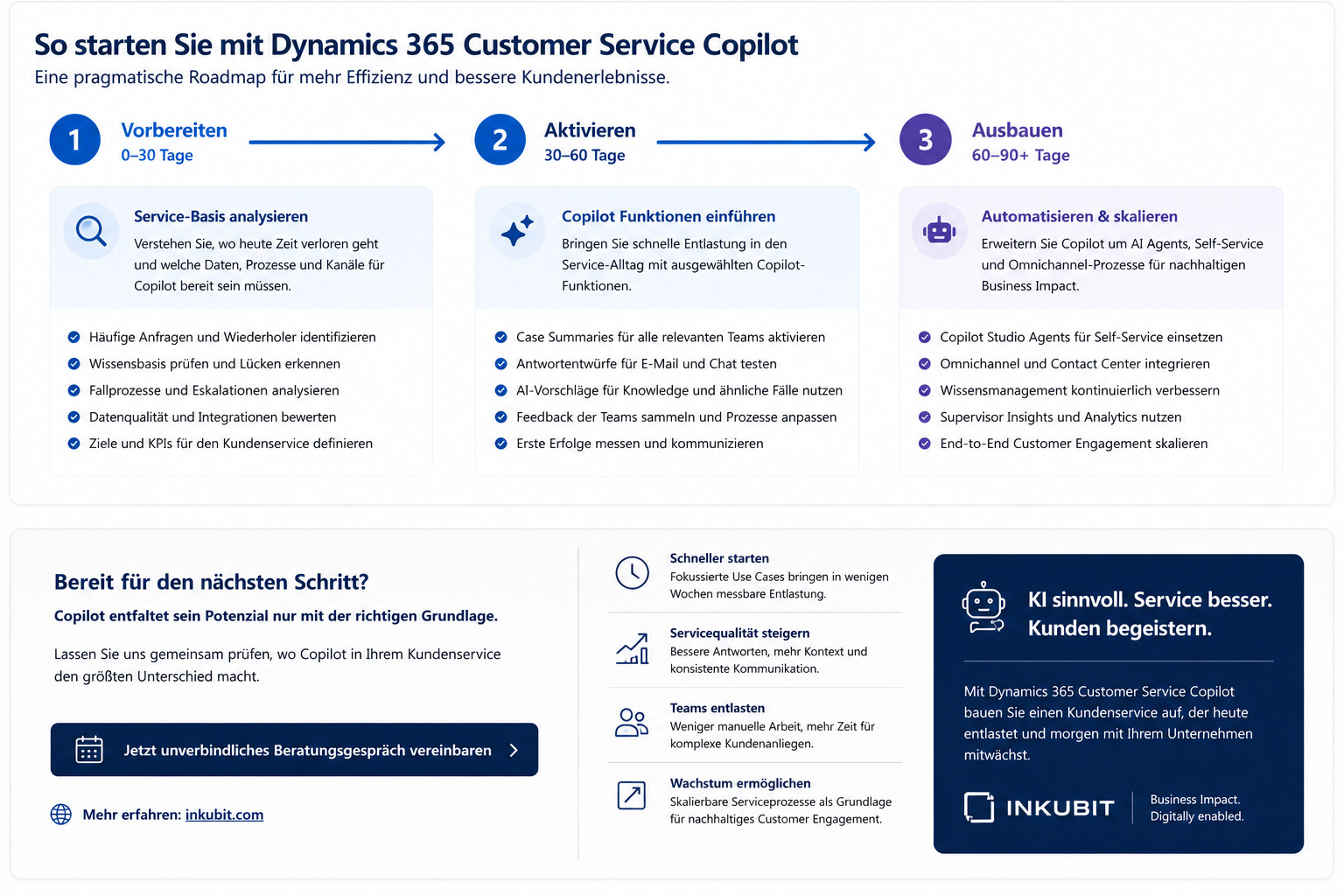
A pragmatic approach can be taken in three steps.
| Step | Focus | Goal |
| 1. Check the service base | Analyze cases, the knowledge base, channels, processes, and escalations | Clarifying where Copilot is most beneficial |
| 2. Enable Copilot features | Case Summary, Draft Responses, Knowledge Search, and Testing Similar Cases | Provide quick relief for service staff |
| 3. Expand automation | Integrate AI agents, self-service, contact centers, and knowledge processes | Enable scalable customer engagement |
This order is important. If companies jump right into using AI agents without first clarifying data, knowledge, and handoffs, they often end up with just another channel. If they improve their operational service work first, they can realize benefits more quickly and then automate in a targeted manner.

Requirements Companies Should Be Aware Of
Copilot can only deliver its full value if the fundamentals are in place. These include clean customer data, well-maintained knowledge articles, clear permissions, defined service processes, and an understanding of when AI suggestions need to be reviewed.
Microsoft itself lists the prerequisites for Copilot features. In "Manage Copilot Features in Customer Service," , Microsoft explains, among other things, that Copilot features must be enabled by administrators. Depending on the feature, licenses, roles, region, and configuration may play a role.
For companies, this means that technical implementation is only part of the job. Professional training is just as important. Service teams need clear guidelines on when to use Copilot, how to review results, and how to feed feedback back into the knowledge base.
Potential for Customer Service
The business value of Dynamics 365 Customer Service Copilot stems primarily from improved workflows. Employees understand cases more quickly, draft responses more efficiently, find information more easily, and can handle recurring issues more consistently. At the same time, it lays the groundwork for further automation.
The potential lies particularly in five areas:
| Area | Effect |
| Productivity | less manual research and paperwork |
| Quality of Service | More consistent answers and better case context |
| Orientation | Faster orientation for new employees |
| Knowledge Management | Make more knowledge from real-world cases usable |
| Scaling | Laying the Groundwork for AI Agents and Self-Service |
The most important point here is this: Copilot is not a substitute for good service processes. It makes good processes faster and bad processes more visible. Companies should therefore not only enable the feature, but also consciously design their service processes around Copilot.
Conclusion: Copilot improves customer service right where the work actually happens
Dynamics 365 Customer Service Copilot is significant because Microsoft integrates AI directly into day-to-day service operations. Case summaries, draft responses, knowledge suggestions, similar cases, and AI agents address specific workflow steps. As a result, AI can make customer service not only faster but also more structured.
However, the greatest value does not come from activating individual features. What matters most is how well Copilot integrates with data, knowledge, processes, and employees. Companies looking to improve their customer service with Microsoft AI should therefore not start with a bot. They should start where service teams are currently wasting time and where customers are waiting too long for clear answers.
Dynamics 365 Customer Service Copilot offers a concrete path to achieving this: less manual work, better use of knowledge, and a service model that can gradually evolve toward AI agents and intelligent customer engagement.
FAQ
What is Dynamics 365 Customer Service Copilot?
Dynamics 365 Customer Service Copilot is an AI-powered assistant for service agents in Microsoft Dynamics 365 Customer Service. Among other things, Copilot helps summarize cases and conversations, answer questions, draft emails and chat responses, and leverage knowledge within the service process.
What advantages does Copilot offer in customer service?
Copilot can reduce the workload on service teams by making case context available more quickly, generating draft responses, suggesting relevant knowledge articles, and helping teams find similar cases. This allows inquiries to be handled more quickly and consistently.
Will Dynamics 365 Customer Service Copilot replace service employees?
No. Copilot supports employees with specific tasks, but it does not replace the responsibility, judgment, and interpersonal skills required in customer service. Human oversight remains essential, especially in complex, sensitive, or escalated cases.
What is the difference between Dynamics 365 Customer Service and Dynamics 365 Contact Center?
Dynamics 365 Customer Service focuses on case management, service processes, knowledge management, and employee support. Dynamics 365 Contact Center expands on this approach to include omnichannel communication, contact center capabilities, voice, messaging, and cross-channel service experiences.
Which Copilot features are best for beginners?
Case summaries, draft responses for email and chat, knowledge base article suggestions, and similar cases are particularly well-suited for getting started. These features integrate directly with existing service processes and can quickly reduce the operational workload.
What requirements does Copilot need to meet in customer service?
Organizations need well-maintained customer data, a usable knowledge base, clear service processes, appropriate permissions, and an activated Copilot configuration. Depending on the role, license, role, region, and admin requirements may apply.
How do companies get started with Dynamics 365 Customer Service Copilot?
A good place to start is by analyzing the most common service requests, the current knowledge base, case handling, and escalation processes. After that, Copilot features can be activated in a targeted manner and evaluated based on specific service goals.