Artificial intelligence is currently evolving far beyond traditional chatbots or simple text generators. Microsoft Copilot Agents are opening up new possibilities for automating routine tasks directly within daily workflows and managing operational processes more intelligently. Rather than simply generating responses, agents can retrieve information, analyze data, summarize content, or perform actions in other systems.
Companies with many manual workflows, in particular, are therefore focusing intensively on how AI can be meaningfully integrated into existing processes. The combination of natural language, Microsoft 365, Dynamics 365, and the Power Platform is particularly exciting. This gives rise to practical use cases that are not only interesting in theory but actually save time and simplify processes in everyday work.
However, many companies are still approaching the topic in a very vague manner. They are testing AI without defining specific processes or clear goals. This is precisely where Copilot Agents differ from traditional AI applications. They are specifically designed for operational tasks and are directly connected to existing data sources and systems.
In this article, you’ll learn which tasks are particularly well-suited for automation today, how companies go about setting up Copilot Agents, and what really matters when it comes to implementation.
What Sets Copilot Agents Apart from Traditional AI Tools
Many AI applications today primarily function as assistants for specific tasks. They help with writing, answer questions, or generate summaries. Copilot Agents go significantly further. They can actively interact with systems and support operational processes.
This opens up significantly more practical applications in everyday use. For example, an agent can retrieve information from Dynamics 365, analyze meetings, create tasks, or process data between different systems. At the same time, various tools can be combined, enabling not just the creation of individual pieces of content, but also the support of entire workflows.
What is particularly interesting here is the integration of natural language with existing enterprise systems. Users no longer have to interact directly with complex interfaces; instead, they can control tasks using voice commands. This is precisely what makes AI truly operational for many teams for the first time.

Which tasks are particularly well suited for automation today
The greatest value is currently not being created through spectacular future scenarios, but through clearly defined routine processes. It is precisely in these areas that many teams waste time every day on manual tasks, repetitive coordination, or redundant data entry.
Copilot Agents are currently used particularly frequently to summarize information, analyze data, or transfer content between different systems. This includes, for example, project status updates, CRM maintenance, meeting documentation, and internal knowledge searches.
In a project setting, agents can, for example, analyze meetings, identify tasks from meeting minutes, or summarize current project information. This significantly reduces manual administrative work. Teams spend less time on documentation and more time on actual project work.
Many useful use cases are also emerging in sales. Agents can analyze leads, extract information from emails, or prepare opportunities. One particularly helpful aspect is that data no longer needs to be transferred manually between different systems.
The Microsoft 365 environment also offers many practical assistance features. These include, for example:
- Email summaries
- Analysis of Team Messages
- Preparing for Meetings
- Document preparation
- Task Management
It is precisely these kinds of processes that demonstrate that Copilot Agents are already capable of providing concrete operational support today—and are not merely experimental AI features.
Here's how companies go about setting up Copilot Agents
Many companies are currently making the same mistake. They jump right into complex AI projects and try to fully automate large-scale processes. In practice, small and clearly defined use cases work much better.
The most important step, therefore, is not the technology itself, but rather selecting a meaningful problem. Good initial use cases are repetitive tasks with clear workflows and fixed data sources. Processes that involve a significant amount of manual work and standardized steps are particularly suitable.
That’s why many successful projects start with small operational tasks. These include, for example, internal summaries, CRM updates, or simple support processes. This quickly yields initial results, and at the same time, teams learn how to effectively build out their agent teams.
It is also important to develop agents incrementally. Successful teams typically start with simple functions and expand them iteratively. This keeps processes manageable and makes it much easier to identify errors.
Why Data Sources and Tools Are Crucial
An agent is only as helpful as the information and systems it has access to. That is precisely why data sources and tool integrations play a central role.
Modern Copilot Agents can be integrated with, among other things:
- Dynamics 365
- Dataverse
- SharePoint
- Teams
- Outlook
- Power Automate
- external APIs
connect.
This is where the real added value lies. The agent does not work in isolation, but rather within existing business processes.
One particularly exciting feature is the ability to integrate different systems. For example, an agent can analyze information from Teams, update data in Dynamics 365, and then automatically generate a document in SharePoint.
This results in end-to-end processes rather than isolated, standalone automations.


Why clear instructions are so important
Many problems arise not from the AI itself, but from unclear instructions. Agents require significantly more structure than many companies initially expect.
The more clearly it is described:
- which problem needs to be solved
- which tools may be used
- What are the rules?
- what the results should look like
the more reliably the agent works.
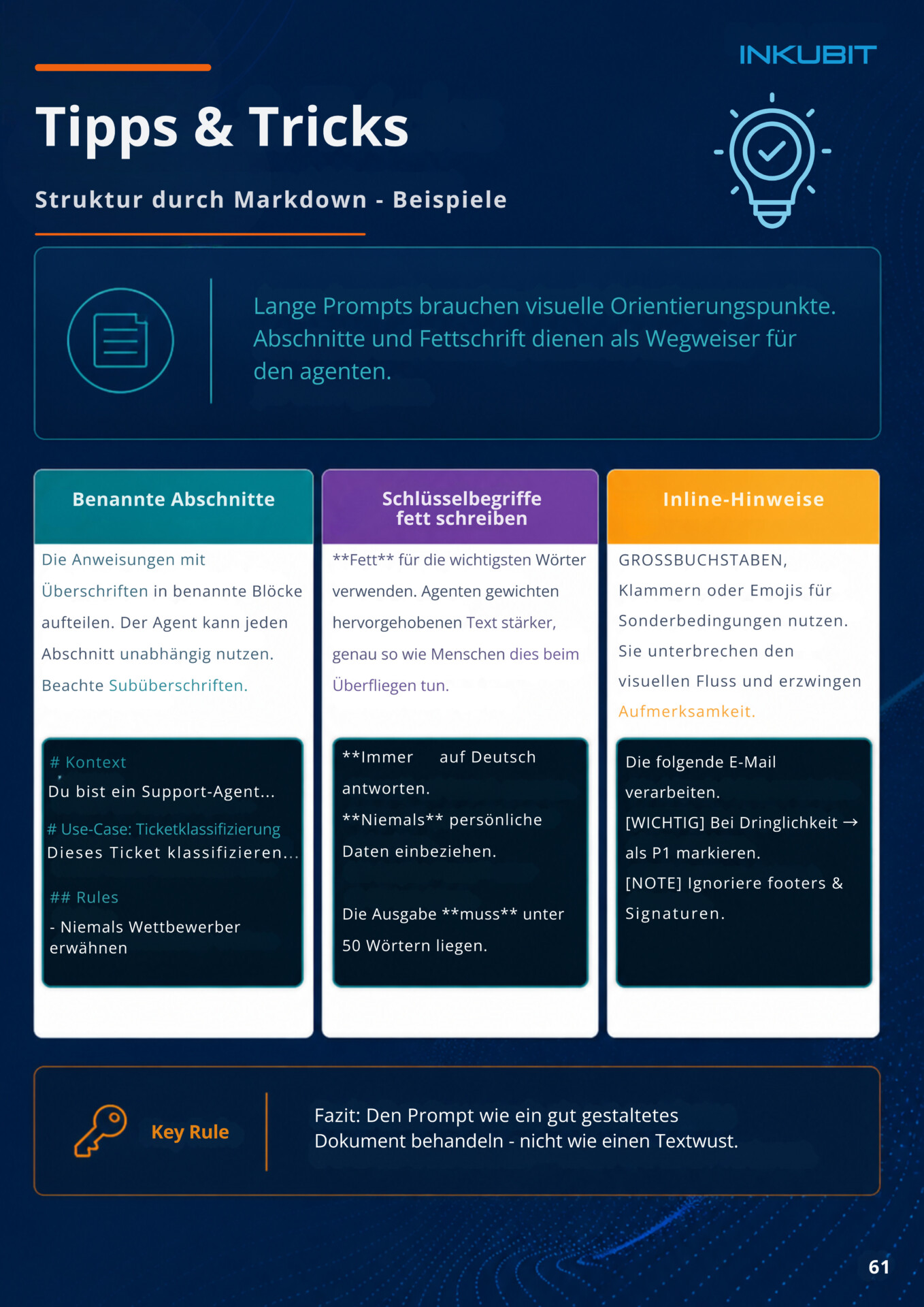
It quickly becomes clear just how important clear instructions are, especially when dealing with more complex processes. General instructions often lead to inaccurate results or unexpected behavior. Structured guidelines, on the other hand, significantly improve quality.
The following are helpful:
- clear headings
- defined steps
- specific examples
- Clear tool descriptions
- clear input and output formats
A good analogy is a new employee. In that situation, too, processes only work reliably if expectations, rules, and procedures are clearly defined. The exact same logic applies to Copilot Agents.
Continuous testing is also particularly important. Instructions rarely work perfectly on the first try. Successful teams therefore improve their agents iteratively and adjust rules and processes step by step.

Why small steps are often more successful
Many AI projects are currently failing not because of the technology itself, but because of overly high expectations. Companies try to fully automate entire processes right away and, as a result, quickly lose control over quality and stability.
Iterative approaches are far more successful. Teams start with small tasks, test processes early on, and expand functionality step by step. This results in significantly more robust solutions, and employees understand more quickly how AI can be meaningfully integrated into existing workflows.
Continuous testing remains particularly important. Agents should not be developed once and then used in production without further modification. Successful projects continuously improve processes and define clear test cases for different scenarios.
This makes it easy to see where additional rules, approvals, or adjustments are needed, especially in production processes.
Why "human-in-the-loop" remains important
Despite modern AI capabilities, agents should not be allowed to operate with unlimited autonomy. Control mechanisms remain essential, particularly for sensitive processes.
That is why many companies deliberately rely on confirmation steps, or so-called approval gates. Certain actions are only carried out after approval. This applies, for example, to:
- Email Delivery
- Calendar Changes
- CRM Updates
- Deletion processes
- Document Sharing
The goal is not complete automation at any cost. What is far more important is controlled support in day-to-day work.
That is why governance, access rights, and data quality remain critical issues, especially in production processes.
What role does Microsoft Copilot Studio play?
Microsoft Copilot Studio is currently evolving into a central platform for creating custom agents. Companies can use it to configure agents, connect data sources, define processes, and integrate various tools.
What is particularly interesting is that many tasks can now be implemented using low-code or no-code solutions. This results in significantly lower barriers to entry than with traditional development projects.
This allows teams to test new use cases more quickly and develop initial automations in a much more practical way. Especially when combined with Dynamics 365, Microsoft 365, and the Power Platform, this is currently opening up a wide range of new applications.
Why Many AI Projects Fail
Many companies are currently focusing too much on technology and not enough on processes. AI alone cannot solve organizational problems.
Common causes of project failure include:
- unclear goals
- poor data quality
- poor instructions
- use cases that are too broad
- lack of governance
- unrealistic expectations
This becomes particularly problematic when agents are expected to operate without clear guidelines or when there are no robust data structures in place.
That is why the most successful projects usually start small, follow clear processes, and develop their solutions step by step.
Conclusion
Copilot agents are currently evolving from simple AI assistants into operational tools for everyday work. Repetitive tasks with clear processes, in particular, can already be effectively automated today.
However, technology alone is not the most important factor for success. What matters most are clear use cases, structured processes, high-quality data, and a phased implementation.
Companies that start small and tackle specific operational challenges typically generate real value much more quickly than organizations with overly ambitious AI projects.
FAQ
What are Microsoft Copilot Agents?
Copilot Agents are AI-powered assistants that can interact with systems such as Dynamics 365, Outlook, Teams, or SharePoint.
What tasks can be automated using Copilot Agents?
For example, CRM maintenance, meeting summaries, project status updates, or document analysis.
Do you need programming skills to use Copilot Agents?
No. Many agents can be created in Copilot Studio using low-code tools and natural language.
What role does Dynamics 365 play in Copilot Agents?
Dynamics 365 often serves as a central data source for CRM, sales, service, or project information.
Why do many AI projects fail?
Often due to unclear goals, poor data quality, or overly complex use cases.
What does "human-in-the-loop" mean?
In this process, critical actions are confirmed or verified by humans before they are executed.
What's the best way to get started with Copilot Agents?
With small, clearly defined processes and simple initial use cases.
AI Agent in a Day Workshop
Many companies are currently facing the challenge of effectively implementing specific AI use cases. That is exactly what our "AI Agent in a Day" workshop focuses on.
In the workshop, teams develop their own Copilot Agents based on real-world use cases and learn step by step:
- how agents are built
- how data sources are integrated
- How instructions work
- how processes can be safely automated
The focus is on practical application rather than pure theory.
We’d be happy to discuss the one-on-one format or upcoming group sessions during a brief informational meeting about the workshop.