Other companies are already building AI agents that qualify leads, prepare project tasks, summarize service cases, or analyze financial data. Many others are still in the same place they were two years ago: they chat with an AI tool and hope that it will boost productivity.
ChatGPT, Microsoft Copilot, and other AI assistants are valuable starting points. But they aren’t the end goal. The next step is to integrate AI with data, processes, and specific tasks. That’s exactly where the difference between occasional assistance and productive automation begins.
Why Chatting Alone Isn't Enough
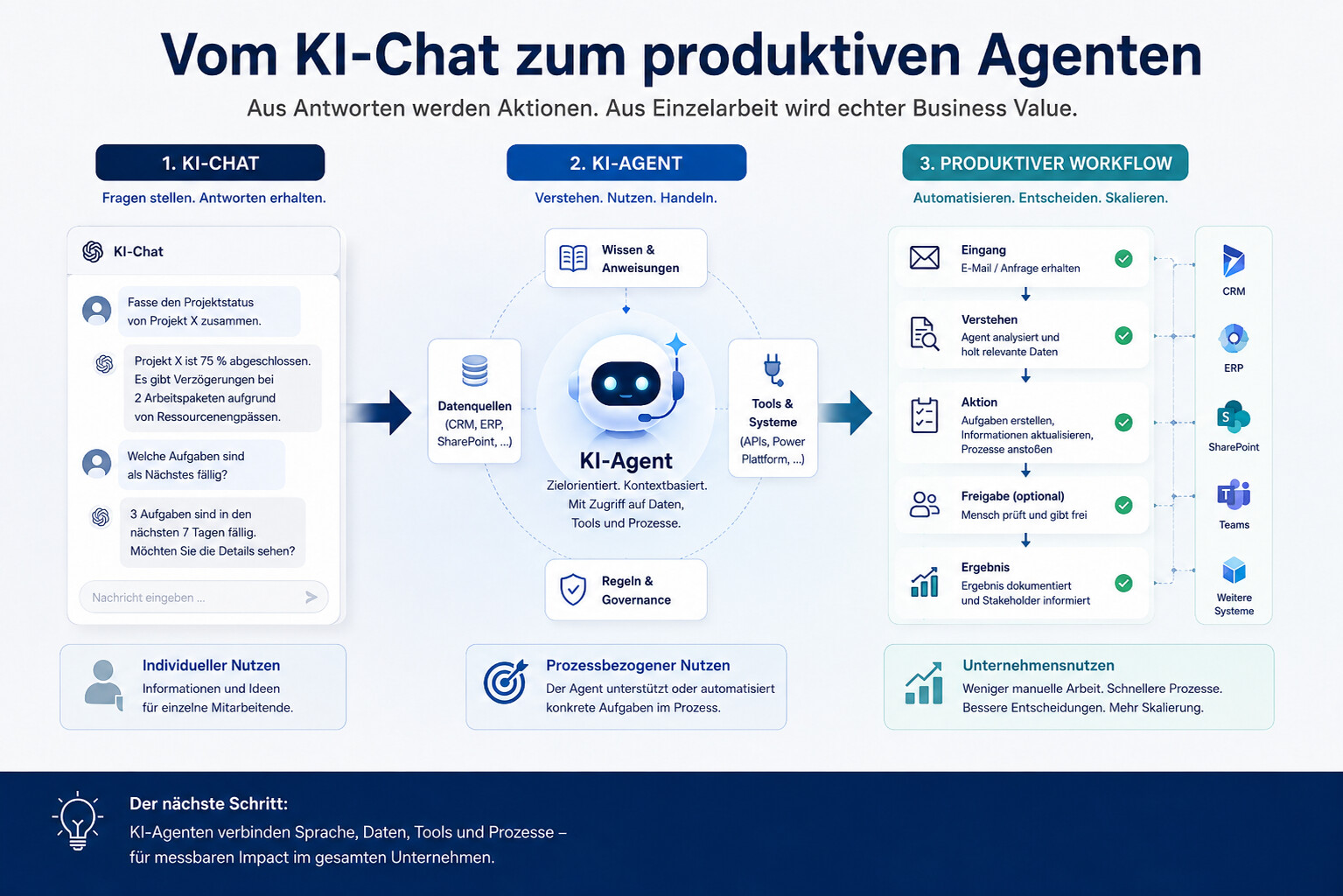
A chatbot answers questions. An AI agent performs tasks within a defined framework. This difference may seem minor, but it changes the way companies use AI.
Anyone who works with ChatGPT receives texts, ideas, summaries, or analyses. This can lighten the workload for individual employees. However, the benefits often remain on an individual basis. One employee saves time, another barely uses the tool, and a third copies data manually between systems. This does not automatically make the company itself faster, more transparent, or more scalable.
AI agents go a step further. They can be connected to systems, data sources, and tools. They read information, verify inputs, generate suggestions, trigger workflows, or prepare decisions. Microsoft describes this on the page Microsoft Copilot Studio exactly this evolution: from simple prompt-and-response agents to agents that can execute entire workflows from start to finish.
This makes AI more relevant for businesses—not because chat is going away, but because chat is becoming the entry point for real processes.
The market is shifting toward agents
Microsoft cites 2025 in the Work Trend Index as the year the “Frontier Firm” will emerge. This refers to organizations where people and AI agents work more closely together. According to Microsoft, 28 percent of managers are already considering hiring AI Workforce Managers. Thirty-two percent plan to hire AI Agent Specialists to develop and optimize agents.
Gartner also sees rapid development. In a forecast on Agentic AI in Enterprise Applications , Gartner predicts that by the end of 2026, up to 40 percent of enterprise applications could include task-specific AI agents. At the same time, Gartner warns against “agent washing”—that is, renaming traditional assistants, chatbots, or automation tools as agents without them actually possessing genuine agent-like capabilities.
This is important for companies. The market creates pressure, but not every agent project generates value. Those who simply test the next tool run the risk of expending effort without achieving any results. On the other hand, those who select specific processes, prepare data, and define clear responsibilities can make AI agents productive in a targeted way.

What Sets AI Agents Apart from Traditional AI Assistants
AI assistants are typically reactive. They wait for input and provide a response. AI agents are more focused on goals, tasks, and actions. They can use information from various sources, execute tool commands, plan intermediate steps, and process results as part of a workflow.
The difference is particularly evident in day-to-day business operations.
| Classic AI Chat | AI Agent in the Workplace |
|---|---|
| answers specific questions | supports or automates recurring workflows |
| often operates without a system context | uses data from CRM, ERP, SharePoint, email, or line-of-business systems |
| generates text or analysis | can prepare tasks, update data, or initiate actions |
| The benefits often vary from person to person | Value is created during the process and becomes measurable |
| requires manual transfer | can be integrated using tools and interfaces |
Here’s an example from sales: A chat can help draft an email to a lead. An agent can review incoming information, set up a lead in the CRM, request missing required fields, create a summary, and obtain approval from a colleague. Only then does AI become part of the sales process.
Why Data and Processes Are Becoming More Important
The more an agent is expected to do, the more important its foundation becomes. An AI agent needs access to the right information, clear rules, and well-defined boundaries. If data is incomplete, contradictory, or scattered across different systems, the agent won’t automatically perform better. Instead, it will highlight the organization’s weaknesses more quickly.
McKinsey describes in "Building the Foundations for Agentic AI at Scale"that agents require consistent, interoperable data. Individual agents may make inconsistent decisions when data is fragmented. Multi-agent systems can lose coordination or propagate errors if the data foundation is flawed.
That is the key point for Data & AI. AI agents are not just about automation. They are about data and process maturity. Companies must determine which data sources can be used, which systems take precedence, what permissions apply, and when human intervention is required.
Good use cases are more specific than “We need an agent.”
Many companies start out too broadly. They want “an agent for sales,” “an agent for HR,” or “an agent for projects.” That sounds ambitious, but it’s rarely a good starting point. A productive agent needs a clearly defined use case.
It’s better to ask a specific question: Which recurring task takes a lot of time? Where do employees frequently have to gather information from multiple systems? Where do errors arise from manual data entry? Where is a suggestion needed, but human approval is still required?
Such use cases can be particularly relevant for project-based companies. A Project Management Agent can retrieve project information, prepare tasks, or summarize status changes. A Lead & Opportunity Agent can organize sales data and prepare new leads. A Secretary Agent can link emails, calendars, and documents. An Account Intelligence Agent can analyze customer data and identify opportunities.
This logic aligns perfectly with the approach “From Use Case to Productive AI Agents”: It is not the agent that comes first, but rather a clear business process that AI makes faster, more transparent, or easier to manage.
Microsoft Copilot Studio: A Gateway to Productive Agents
Copilot Studio is particularly relevant for companies in the Microsoft ecosystem because it can connect agents to Microsoft 365, Power Platform, Dynamics 365, Dataverse, SharePoint, and other data sources. Microsoft describes Copilot Studio as a platform for creating agents, adding knowledge and instructions, connecting tools, building workflows, and operating agents securely.
The development of autonomous agents is particularly interesting. Microsoft announced on its blog "What’s New in Copilot Studio: March 2025" that autonomous agents are now generally available. These agents can respond to events via triggers and execute defined actions. According to Microsoft, actions remain visible via the Activity tab to ensure transparency and control.
This points the way: Agents should not just respond, but actually perform tasks. At the same time, governance remains crucial. Companies must define which actions an agent is allowed to perform on its own, when approval is required, and how errors are detected.
Why Not Every Process Needs an Agent
The hype surrounding agents quickly leads to the wrong question: Where can we use agents? The better question is: Where does an agent add more value than a traditional workflow, a dashboard, or a simple copilot?
Gartner warns in "Gartner Predicts Over 40% of Agentic AI Projects Will Be Canceled by the End of 2027" that many agentic AI projects could fail due to a lack of value, unclear costs, or inadequate risk management. Gartner recommends deploying agentic AI where it delivers clear value or ROI.
That’s not an argument against agents. It’s an argument for better selection. An agent is particularly worthwhile when a task involves multiple steps, requires various data sources, involves preparing decisions, and recurs regularly. For simple, linear processes, a classic Power Automate flow may make more sense. For pure information queries, a Copilot or a better knowledge search is often sufficient.

From Reading to Building: AI Agent in a Day Workshop
Many companies now realize that AI agents are becoming relevant. The next question is a more difficult one: Which use case is truly suitable for getting started, and how can that be turned into a first working agent?
That's exactly why INKUBIT offers INKUBIT "AI Agent in a Day" workshop . The workshop is neither a lecture nor a tool demo. You’ll work on a prioritized use case, build an initial agent prototype using Microsoft Copilot Studio, and test firsthand how AI, data, and processes interact in your own daily work.
The focus is on specific agent scenarios, such as project management, lead and opportunity qualification, administrative tasks in Microsoft 365, or account intelligence. This transforms an abstract discussion of AI into a practical introduction to productive agents.
| Workshop Step | Result |
|---|---|
| Select a Use Case | Clarity on which process is best suited for a first agent |
| Set up an agent | First functional prototype using Microsoft Copilot Studio |
| Test and Adjust | a better understanding of data, tools, instructions, and limitations |
| Define Next Steps | A concrete path for further development and scaling |
The most important benefit: Teams don't just experience what AI agents are theoretically capable of. They see which prerequisites are already in place within their own company and where data, processes, or governance still need to be put in place.
About the "AI Agent in a Day" Workshop
Why AI Agents Are a Business Issue
AI agents are often discussed in technical terms. But their true value lies in business results. They can reduce manual work, make better use of knowledge, shorten turnaround times, and support decision-making. However, this is only possible if they are integrated into real-world processes.
This creates a new challenge for management. It is no longer enough to simply provide employees with ChatGPT or Copilot. Companies must decide which processes should be transformed by AI. They must define how people and AI agents will work together. And they must ensure that data, governance, and responsibilities evolve accordingly.
Competitive advantage does not come from a company simply chatting more with AI. It comes from AI measurably improving operational processes.
Conclusion: The chat was the beginning, not the goal
ChatGPT has shown many companies just how accessible AI can be. But the next step is even bigger. AI agents integrate language, data, tools, and processes. They can prepare tasks, support decision-making, and automate workflows.
That is exactly why companies should not stop at simply using chat. They should assess which recurring tasks are suitable for productive agents, what data infrastructure is required, and what governance measures need to be built in from the start.
Those who just chat today are gaining experience. Those who build agents today are creating structures that deliver measurable business value.
FAQ
What Are AI Agents in a Business Setting?
AI agents are systems that can not only answer questions but also perform or prepare tasks within a defined framework. They use data sources, tools, and instructions to support business processes.
What is the difference between ChatGPT and an AI agent?
ChatGPT is often used for individual questions, texts, or analyses. An AI agent is more deeply integrated into processes. It can use information from systems, perform tasks, prepare results, and seek human approval when necessary.
When is an AI agent worth it?
An AI agent is particularly valuable for recurring tasks that involve multiple steps, multiple data sources, and clear business value. Examples include lead qualification, project status tracking, service cases, meeting preparation, and data analysis.
Do companies need clean data for AI agents?
Yes. The more an agent is expected to take action, the more important it is to have clean, accessible, and linked data. Without a clear data foundation, errors, inconsistencies, and manual rework increase.
What role does Microsoft Copilot Studio play?
Microsoft Copilot Studio can be used to build agents, integrate knowledge, connect tools, and design workflows. It is particularly relevant for companies that already use Microsoft 365, Dynamics 365, Power Platform, or Dataverse.
Do AI agents have to operate completely autonomously?
No. In many business processes, a "human-in-the-loop" approach makes sense. The agent prepares information or actions, and a human reviews and approves them. This boosts productivity without losing control.