In sales, Microsoft Copilot is increasingly evolving from a support tool into a true productivity tool. With the new capabilities offered by Copilot Agents, its use now goes well beyond traditional support.
Sales teams can not only speed up individual tasks but also make entire workflows more structured and consistent. This is achieved not through large-scale automation, but by providing targeted relief in day-to-day operations.
What Microsoft Copilot Can Do for Sales Today
Microsoft Copilot is directly integrated into the core work environment. In sales, this primarily includes Outlook, Teams, Word, Excel, and Dynamics 365 Sales. This allows Copilot to access existing data, communications, and documents.
In sales, this means that information no longer has to be gathered manually. Instead, content is automatically organized based on context. The introduction of Copilot Agents expands on this approach. Agents can take on recurring tasks, organize information, and provide independent support within specific workflows.
The difference is important. While Copilot assists with individual tasks, Agents can support entire workflows.
What specific features Copilot offers in sales
Copilot’s features are now highly practical and can be used directly in everyday work. In the area of communication, Copilot can analyze emails, summarize them, and generate suggested replies. Content is generated based on existing conversations. During meetings within Teams, Copilot can transcribe conversations, summarize them, and identify next steps. This ensures that decisions and tasks are not lost. In CRM systems such as Dynamics 365, Copilot assists with data maintenance, the analysis of customer information, and the assessment of sales opportunities.
Documents such as proposals or presentations can be automatically generated or customized. Copilot uses existing content and adapts it to the specific context.
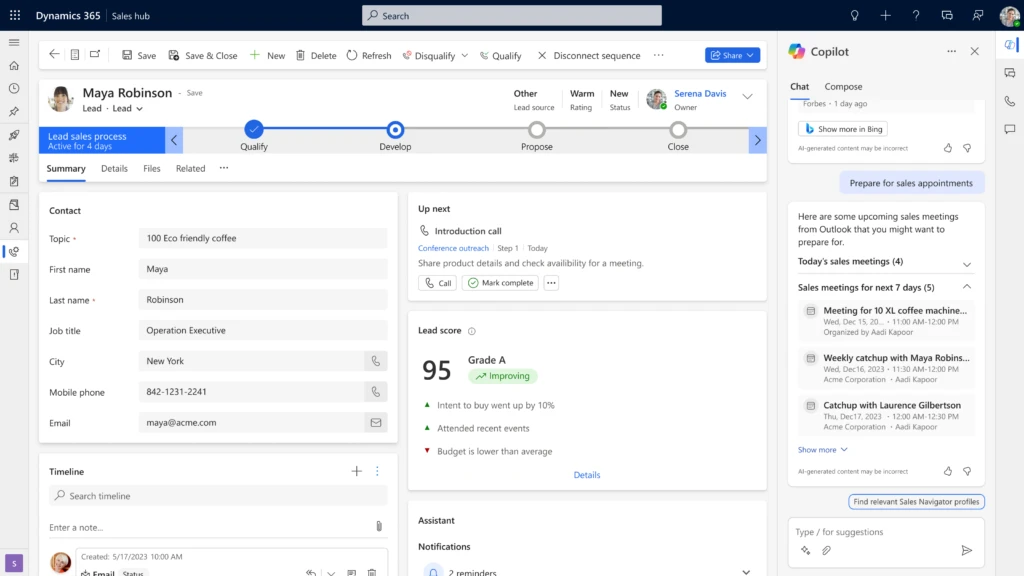
Copilot Agents: What This Means
Copilot Agents is taking the use of AI in sales to a whole new level.
Agents can be configured for specific tasks or processes. They access defined data sources and operate within clearly defined rules.
For example, this allows you to:
- Automatic scheduling of customer appointments
- Structured tracking of deals
- Support in qualifying leads
The advantage lies in repeatability. Tasks that occur regularly can be handled consistently.
Specific use cases in day-to-day sales
The value of Copilot is particularly evident in real-life situations.
Preparing for a meeting with a client
Copilot can compile all relevant information ahead of a meeting. This includes previous conversations, emails, documents, and CRM data.
A Copilot Agent can streamline this process. A structured overview is automatically generated before each appointment.
This reduces preparation time and ensures consistent quality.
Follow-up and next steps
After a conversation, Copilot can generate a summary and suggest specific next steps. Tasks can be imported directly into systems.
An agent can also check whether follow-ups have been completed and send reminders if necessary.
As a result, fewer issues are left unresolved, and processes become more reliable.
Preparation of quotes
Copilot can access existing content and use it to create new drafts. The content is adapted and structured.
An agent can help automatically insert standard elements and tailor content to specific types of customers.
The effort required decreases, while quality remains consistent.
Overview of the Pipeline and Activities
Copilot can analyze and summarize data from the CRM. Sales teams get a structured view of deals, risks, and next steps.
An agent can monitor additional criteria. For example, deals with no activity or missing next steps.
This makes it easier to prioritize and manage tasks on a day-to-day basis.
Where Copilot and Agents Are Especially Helpful in Everyday Life
The greatest benefit comes from tasks that occur regularly and take up a lot of time.
These include:
- Compilation of information
- Recording of conversations
- Creation of standard content
- Activity Tracking
These tasks are necessary, but they are often done manually and prone to errors. Copilot and Agents help alleviate this burden.
Quick Steps: How to Get Off to a Good Start
The introduction should be clearly structured. Not every feature automatically adds value.
The key steps are:
- define specific use cases
- Identify recurring tasks
- Integrate Copilot seamlessly into existing tools
- Set up initial agents for simple workflows
- Check and adjust usage regularly
This creates a clear focus on actual benefits.
What is crucial for successful implementation
Copilot and Agents are most effective when they are integrated into existing workflows.
Important requirements are:
- consistent and well-maintained data
- clear sales processes
- shared understanding within the team
Without this foundation, the effect remains limited.
Conclusion: Copilot is becoming an integral part of the sales team
Microsoft Copilot is increasingly becoming an indispensable tool in day-to-day sales operations. Copilot Agents, in particular, make it possible to manage recurring tasks in a structured way. The value lies not in individual features, but in the combination of support, structure, and consistency. Sales teams can work faster, make better use of information, and create more stable processes. The key is how strategically Copilot is used and how well it is integrated into existing processes.
Are you looking to implement Copilot and Copilot Agents in your company soon? Let’s have a quick chat about how we can help you with that!
FAQ
What are Copilot Agents in Sales?
Copilot Agents are configurable features that support recurring tasks in sales and partially automate them.
Where does Copilot provide the greatest benefit?
Especially when it comes to planning, documentation, communication, and tracking activities.
How to get started with Copilot Agents
With clearly defined use cases and simple processes that can be expanded step by step.